PD AWS MariaDB — Resell Fully-Managed MariaDB Databases on AWS in WHMCS
Resell fully-managed MariaDB databases on AWS — provisioned, billed and managed in WHMCS
Made and supported by Projektif Digital Ltd.
Runs inside PD Modules, the panel
every module installs into.
Databases
Live database fleet — every provisioned instance with its AWS region, backing type and live availability status, all from a single admin view.Self-diagnostic report — one click confirms your AWS credentials, SDK and licence are healthy and exactly how many databases are running on your account.Client database overview — start/stop/reboot controls, a ready-to-paste connection string, TLS certificate download and a live CPU snapshot, all without leaving WHMCS.Self-service IP firewall — clients add or remove allowed CIDRs in seconds; changes apply instantly to the underlying AWS security group.Fully theme-agnostic — identical experience on Bootstrap 3 (Six) and Bootstrap 4 (Twenty-One) so it works on any WHMCS client theme without custom styling.Real-time performance graphs — CPU utilisation, connections, freeable memory and free storage pulled live from AWS CloudWatch so clients can monitor their database without logging into AWS.1 / 6
PD AWS MariaDB lets a hosting company sell managed MariaDB databases as its own product. Your customer orders in your WHMCS cart, a dedicated MariaDB instance is built on Amazon RDS in your AWS account, and your customer runs it from your client area: connection details, usage graphs, snapshots and a firewall, with no AWS console and no AWS login. You set the price, AWS bills you its cost, and the difference is your margin.
It is built for hosts whose customers ask for MariaDB by name, whether for a CMS, a shop or an application that already speaks it, and who want to answer with a product line instead of a support ticket.
Why hosts choose PD AWS MariaDB
MariaDB on its own terms. This module sells MariaDB on Amazon RDS and nothing else. Lightsail databases run only MySQL and PostgreSQL, so Lightsail is never offered here, and your products never promise something AWS cannot deliver. The customer's page shows a ready-to-paste mariadb command, not a generic one.
Graviton plans, priced by you. One click generates five plans from Micro to X-Large on AWS's Graviton processors, from db.t4g.micro to db.m6g.xlarge, alongside billable storage, region and version choices. The MariaDB versions offered are the ones AWS currently offers in your region. Every option starts at no extra charge and you set the prices.
Every customer is isolated. Each order gets its own instance, its own master credentials and its own firewall group. Nothing is shared, even with another installation using the same AWS account, and the module refuses to take over a database it did not create.
Changes made safely. A snapshot is taken before a plan or storage change is applied, so a restore point exists. Storage is only ever grown, online: a downgrade never shrinks a database or puts data at risk.
Failures are visible, not silent. If AWS refuses an order, or your key lacks a permission, the real reason is recorded for you and the customer is never left waiting on a database that is not coming. Running setup twice never creates a second instance.
Nothing left billing. Terminating a service deletes the database with its backups, its snapshots and its firewall group straight away. A host who wants a copy keeps one in the AWS console first.
How it works
Connect your AWS account. Add an access key once on a WHMCS server record. The secret is stored encrypted and never reaches a customer page. Test Connection makes one read-only call and creates nothing.
Create your product. Add a WHMCS product, choose the module on its Module Settings tab and switch on automatic setup. Set region, plan, storage and MariaDB version, then press Generate plans to offer choices at checkout.
Your customer orders. The instance is built in the region and size they chose, usually within a few minutes. The customer's page says it is being set up, then fills in with the connection details by itself.
You get paid, they manage it. WHMCS keeps billing as usual. Suspend, unsuspend and terminate follow your normal billing.
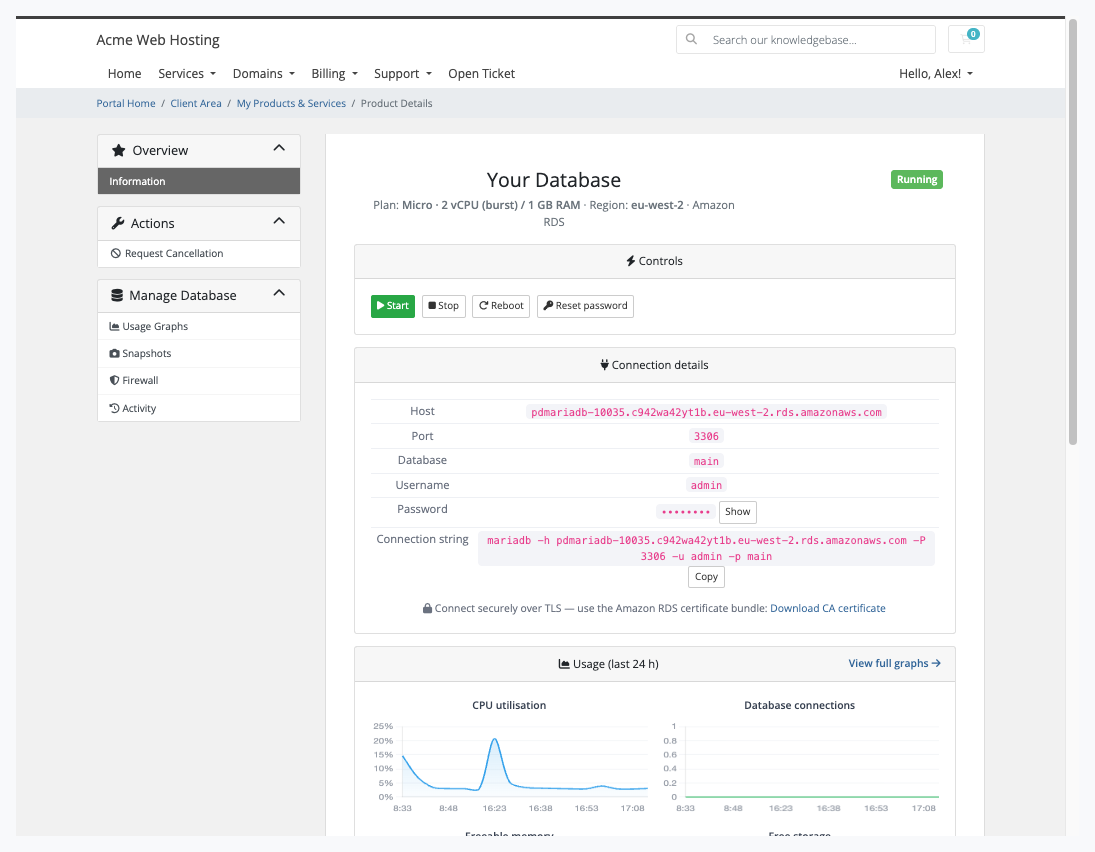
The customer's database page: power controls, host, port, database and username with copy buttons, a mariadb command and the Amazon certificate bundle
What you get in WHMCS
Selling and pricing
Cart options generated from the live AWS catalogue: region, plan, storage, high availability, public access and MariaDB version
Storage as a billable choice, from 20 GB
A "High availability (Multi-AZ)" choice that gives the customer a standby in a second zone, and an option to make the database publicly accessible, still limited to the addresses the customer allows
Options you hide are fixed to the product's own setting
Sync with AWS hides options AWS has retired and adds new ones, without touching prices or existing customers
A name prefix for new databases, applied to new orders only
Provisioning you can trust
A paid order provisions with no admin step once automatic setup is on
Plan upgrades resize the instance in place and keep its data; Multi-AZ is switched on or off in place
A change that cannot be applied in place is reported to you as not applied, never accepted silently while the bill changes
Suspend stops the database and keeps it stopped, even though AWS restarts stopped databases after seven days; the customer cannot start it while suspended
Billing stays yours: the service is charged at the prices of the product and its options, and nothing is metered into WHMCS
Running it day to day
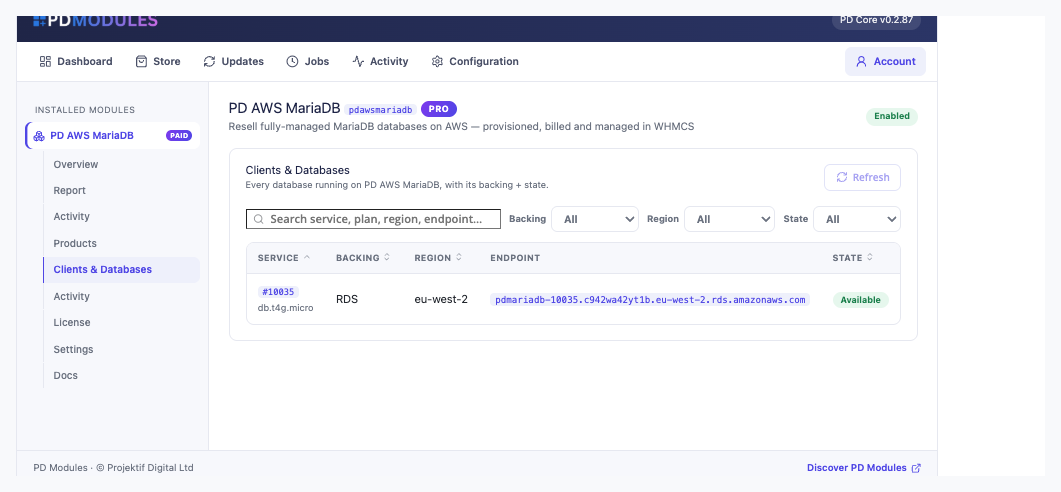
Clients & Databases lists every database with its service, plan, region, endpoint and live state
An activity log of provisioning, resizes, snapshots and password resets across every service
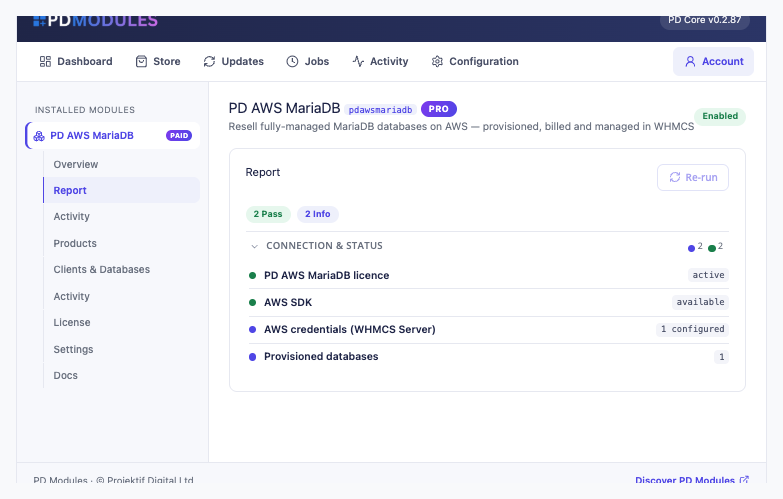
A report that checks your licence, the AWS SDK and how many credential sets and databases you have
Read-only assistant tools that report a service's database state and recent provisioning activity, with no way to create, resize, delete or restore anything
What your customers get
Start, stop and reboot, and a stopped database keeps its data
Password reset with the engine's real rules stated on the form (8 to 41 characters), and a weak password refused before anything is queued
Connection details with one-click copy, the password masked until revealed, and the Amazon certificate bundle with the exact client flag to verify the server
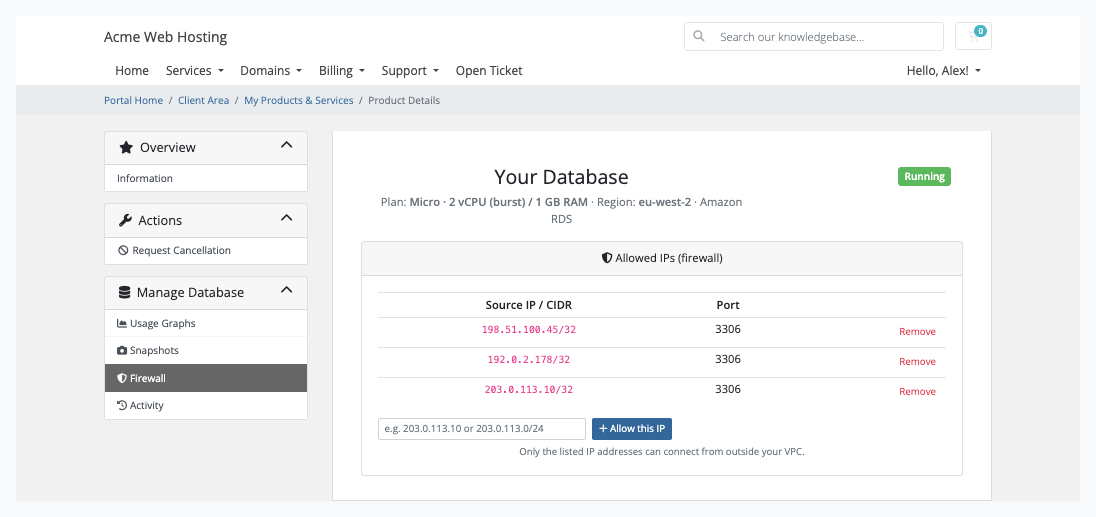
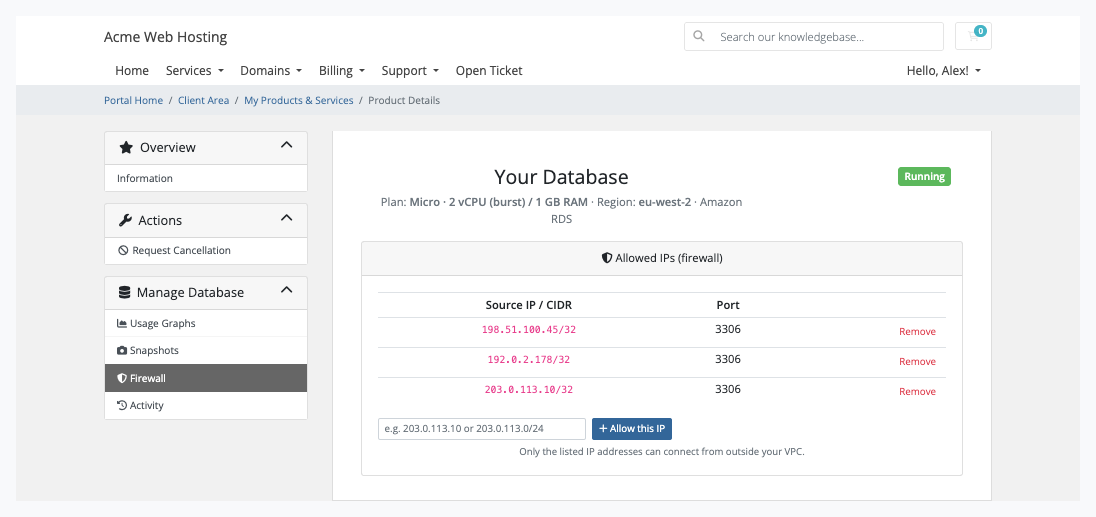
A firewall of allowed IPv4 addresses and ranges for the database port, applied on the next scheduled run
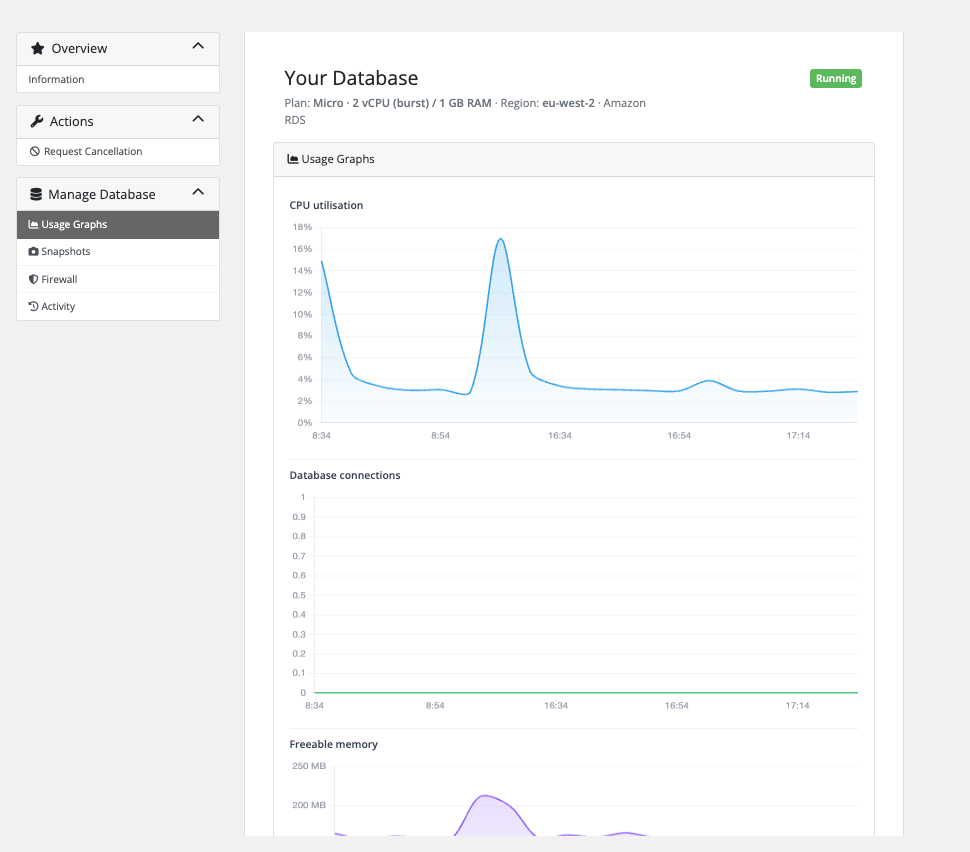
Usage graphs for CPU, connections, freeable memory and free storage over the last 24 hours, from AWS's own metrics
Snapshots they take and delete themselves, with the automated daily backups, kept seven days, listed beside them
Activity in plain words, with the time and outcome of each action
The customer's firewall: allowed IP addresses for port 3306, added or removed without a ticketUsage graphs: CPU, connections and freeable memory over the last 24 hours
Snapshots, Firewall, Connection details and Usage graphs are each a switch on the product. Turn one off and it disappears from the customer's page, and the request is refused however it is made. The pages render natively on WHMCS's Six, Twenty-One and Nexus themes, and every word can be translated or reworded with override files that survive updates. Customers see only your brand.
Security built in
Your AWS keys live on the WHMCS server record, stored encrypted, and never appear on a customer page, in a message or in a log.
Database passwords are stored encrypted on the service, including one the customer sets with Reset password.
Only the database's own port is ever opened, and only to the addresses the customer lists.
Restores stay with you: customers take and delete snapshots, and you restore from the AWS console when asked.
One product, every feature
PD AWS MariaDB is one paid module with everything included. There are no tiers, no add-ons and no per-database fee from us: you pay AWS at cost and keep the margin. Each order creates a real, billable AWS resource, so there is no free trial.
If your subscription ever lapses, customers' databases are never touched or deleted. You get a 14-day grace period with everything working and a renewal reminder, then admin management locks while customers keep being served, and only after that do customer features pause behind a neutral "temporarily unavailable, please contact support" message. Renewing restores everything at once.
Requirements
WHMCS 9 or later on PHP 8.2 or later, with the ionCube Loader
An AWS account and an access key with the Amazon RDS permissions we list, plus the security group permissions every order needs
PD Modules, the free control panel every PD module installs into
Questions
Do I need my own AWS account?
Yes. Databases are provisioned on your own AWS account, in the region you choose, so you keep full control and the margin. Your AWS keys are stored encrypted in the WHMCS server record and never appear in the client area.
Who pays for the AWS usage?
You do — the database runs on your AWS account. You set the sell price on your WHMCS product and bill your client through WHMCS as normal, keeping the difference as margin.
Is MariaDB compatible with MySQL?
Yes. MariaDB is wire-compatible with MySQL, so it's a drop-in database for the vast range of applications that expect MySQL, while giving you MariaDB's performance and open governance.
What plans can I offer?
One click generates a curated set of Graviton-powered RDS plans (db.t4g.micro up to db.m6g.xlarge) plus billable storage sizes, linked to your product as configurable options. You price each tier.
Can clients resize or add storage themselves?
Storage and plan changes are billed through WHMCS Upgrade/Downgrade — never a free client button. They apply in place with an automatic safety snapshot first, so data is never lost, and storage is only ever increased.
Is it secure?
Every database sits in its own security group (clients only manage their own IP rules), all connections are TLS-encrypted with the Amazon CA bundle offered for download, and master passwords are masked until explicitly revealed.
Which WHMCS themes are supported?
The client area renders natively on Six (Bootstrap 3), Twenty-One and Nexus (Bootstrap 4) with no extra CSS, and can be translated or rebranded with a language file or template override.
What happens when a client cancels?
The module deletes the RDS database cleanly on termination — no orphaned instances and no surprise AWS charges.
What happens if my subscription lapses?
Nothing of yours is touched, and nothing is deleted. The module steps down in stages instead: a 14-day grace period where everything still works and you get a renewal reminder, then admin management locks while your customers carry on being served, and only after that do the customer-facing features stop — behind a neutral "temporarily unavailable, please contact support" message that never mentions licensing to your customer. Anything the module provisioned keeps running in your own account throughout, and your data and settings stay exactly where they are. Renewing restores everything immediately.
What’s new in 0.4.63
On Blesta, the plan options screen now says the region, plan and version are chosen on the package, instead of reporting a database error.