PD DigitalOcean App Platform — Sell Managed App Hosting as a Native WHMCS Product
Sell fully-managed app hosting on DigitalOcean under your own brand — deploy from Git or a container image, billed in your billing system
Made and supported by Projektif Digital Ltd.
Runs inside PD Modules, the panel
every module installs into.
Servers & Compute
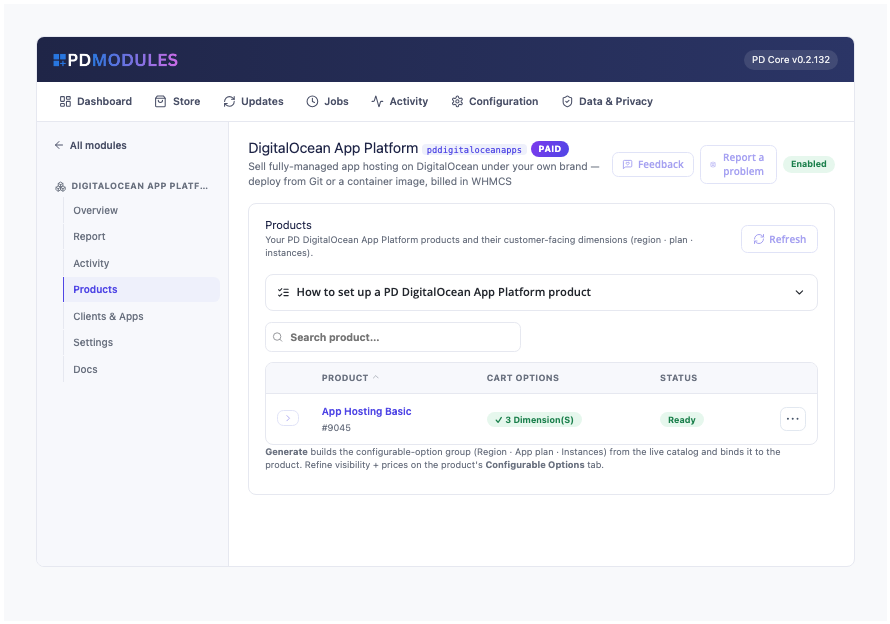
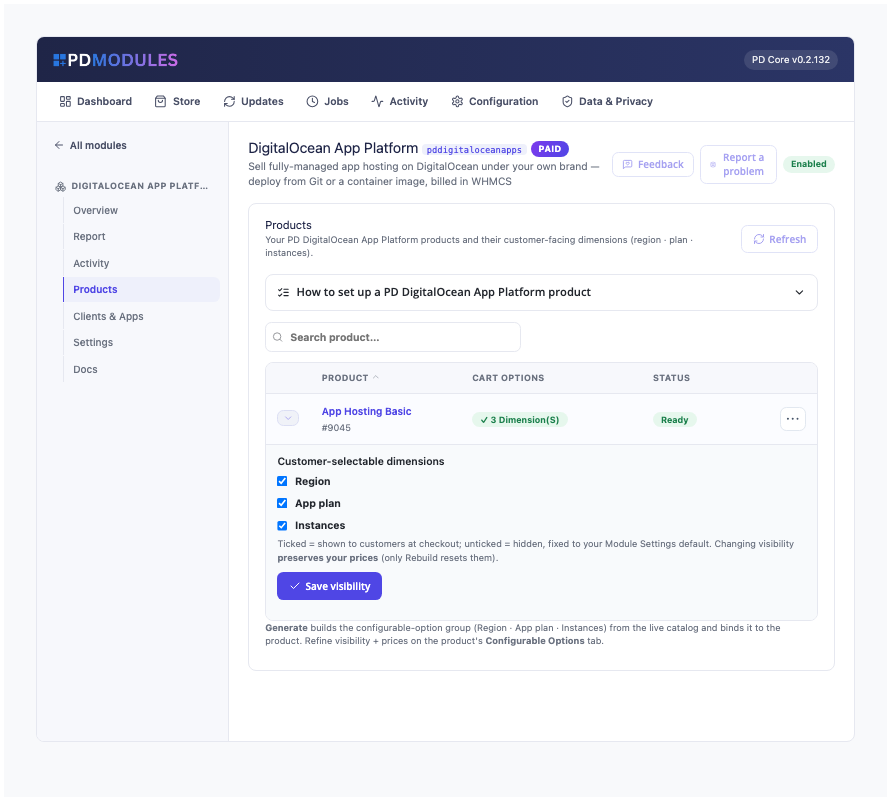
One-click checkout options — generate region, plan and instance-count pricing straight from the live DigitalOcean catalog, no manual product setup.Control exactly what customers choose at checkout — show or hide region, plan and instance count per product without losing your prices.Every customer app in one fleet view — plan, source, region and live status, so you always know what's running before a support ticket comes in.A full audit trail of every deploy and cancellation — termination removes the app cleanly, so you never chase down orphaned resources.A live health check on your DigitalOcean connection and licence — know provisioning is ready before a customer ever places an order.Your customer's own app-hosting dashboard — live URL, one-click redeploy and self-service source changes, no support ticket required.Looks native on any WHMCS theme — the same polished management panel your customers already know how to use, zero extra styling work for you.1 / 7
PD DigitalOcean App Platform lets a hosting company sell fully managed app hosting as its own product. Your customer orders in your WHMCS cart, points the app at a public Git repository or a Docker Hub image, and DigitalOcean builds and runs it on your account with no servers for either of you to manage. The customer manages the app from your client area, which carries your brand. You set the price, DigitalOcean bills you its list price, and the difference is your margin.
It is built for hosts who want to offer app hosting to developers without running build servers, and without a support ticket every time a customer wants to redeploy after a push.
Why hosts choose PD DigitalOcean App Platform
Sell app hosting under your own brand. Customers see your company, your prices and your client area. Apps run on your own DigitalOcean account, so customers need no account of their own, and your account and API token are never exposed to them.
Every order sets itself up. The app is created when WHMCS sets the order up, with the region, plan and instance count the customer chose at checkout. Suspend, unsuspend and terminate follow your normal WHMCS billing.
Deploy from Git or a container image. The customer supplies a public Git repository over https, with an optional branch, or a public Docker Hub image. Add Repository URL and Branch fields to the product and the app is built and deployed straight from the order, or let customers enter it later from their service page.
Customers help themselves. Redeploy after a push, point the app at a different repository or image, and read a plain activity history, all without a ticket. The current version keeps serving until the new one is live.
Pricing with the cost in view. The Products page shows what DigitalOcean charges each month for every app plan, read live and shown in dollars and in your default currency. Set a margin and each choice shows a suggested price and your margin per sale. The margin is optional and changes nothing until you use it.
Nothing left billing. Terminating a service deletes the app from your DigitalOcean account, and a background sweep confirms it is gone. No create, retry or double request can leave a second app billing unseen.
How it works
Connect your DigitalOcean account. Create an API token with Full Access, add it once on a WHMCS server record, and press Test Connection. It makes one read-only call and changes nothing on your account.
Create your product. Set region, plan and instance count as defaults, then generate the cart options in one click from DigitalOcean's live catalogue. You choose which the customer sees; anything hidden follows your product setting.
Your customer orders. They pick region, plan and instances (one to five) at checkout and pay. With a source supplied, the app is built and deployed automatically; otherwise the service page asks for one.
The app goes live. The first build takes a few minutes. When the deployment is active, the live https address appears on the service page. A deployment that fails is shown as failed, never as live.
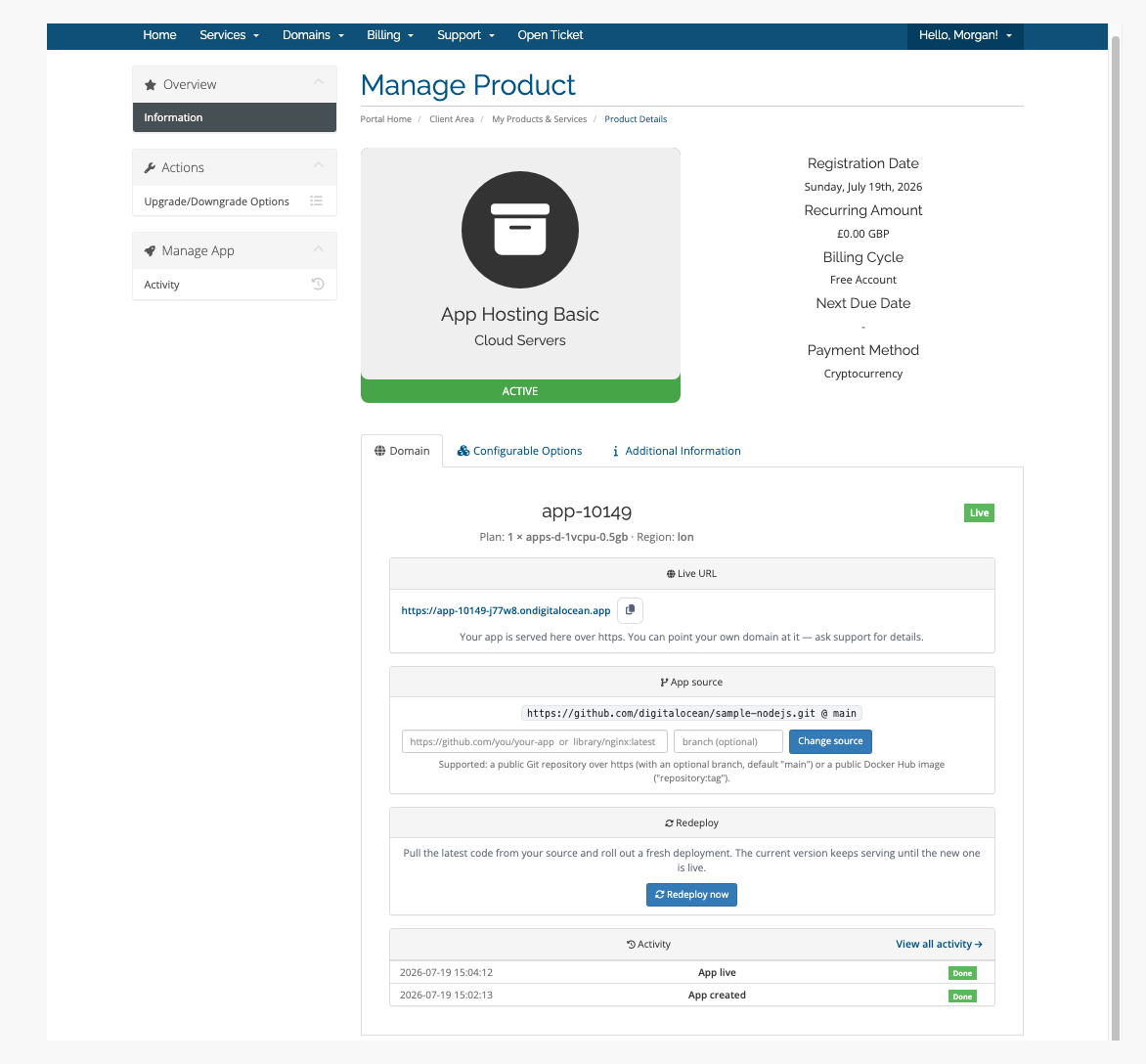
The customer's app page: live address, source, redeploy and activity in one place
What you get in WHMCS
Selling and pricing
Cart options for Region, App plan and Instances, generated from the live DigitalOcean catalogue; prices start at zero for you to set on the Configurable Options tab
Show or hide each option per product; saving visibility keeps your prices
Rebuild from the live catalogue at any time: choices you hid stay hidden and customers keep the choices they already made
Customers change plan and instance count through WHMCS Upgrade/Downgrade, once you allow it on the product, and the running app keeps its source
A resource name prefix for new apps, and a DigitalOcean project to group them under
Optional HTML on the customer's overview page, filled in with the app's name, status, address, region, plan and source
Provisioning you can trust
A region and plan combination DigitalOcean cannot build, a shared plan with more than one instance, is refused before anything is created
A service with no source shows that it is waiting, with a form for a repository or image; anything that is not a public https repository or a public Docker Hub image is refused with a clear message
Suspend puts the app into maintenance: visitors see a maintenance page, nothing is deleted, and unsuspending takes it out again. DigitalOcean keeps billing a suspended app
A regular read-only check flags an app deleted directly at DigitalOcean
Running it day to day
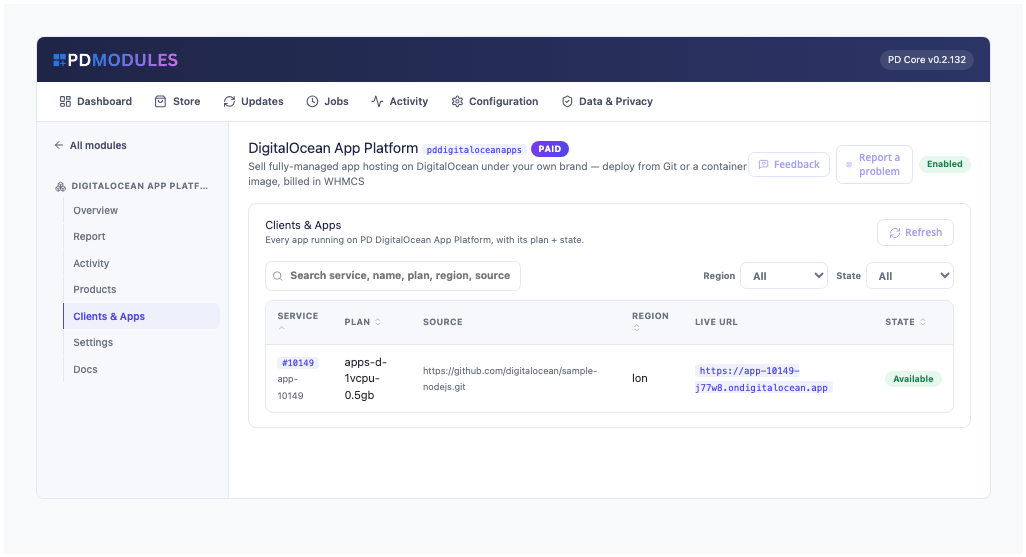
Clients and Apps lists every app against the client paying for it, with plan, source, region, live address and state
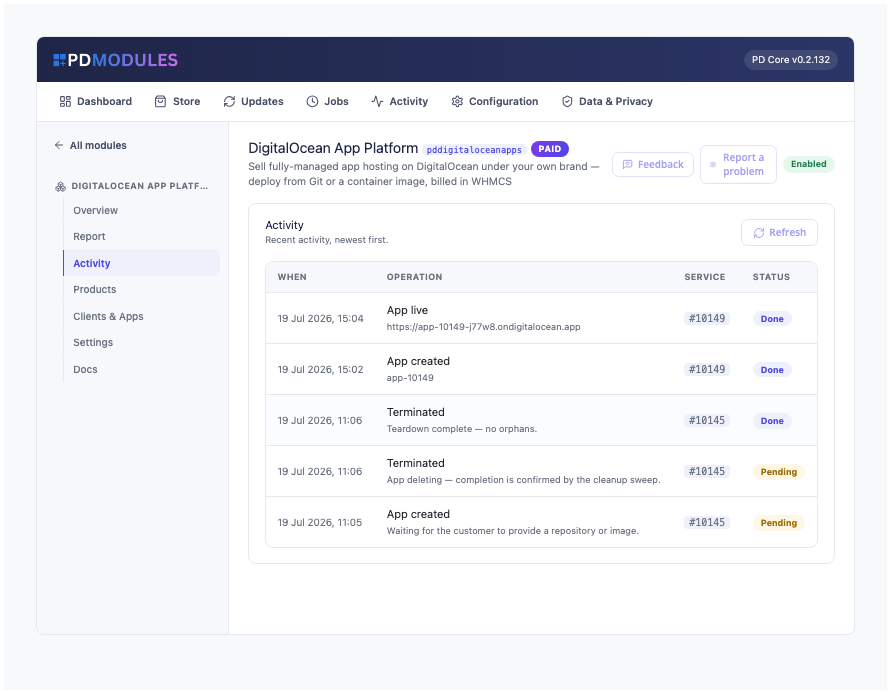
Activity of every deployment and termination across your services
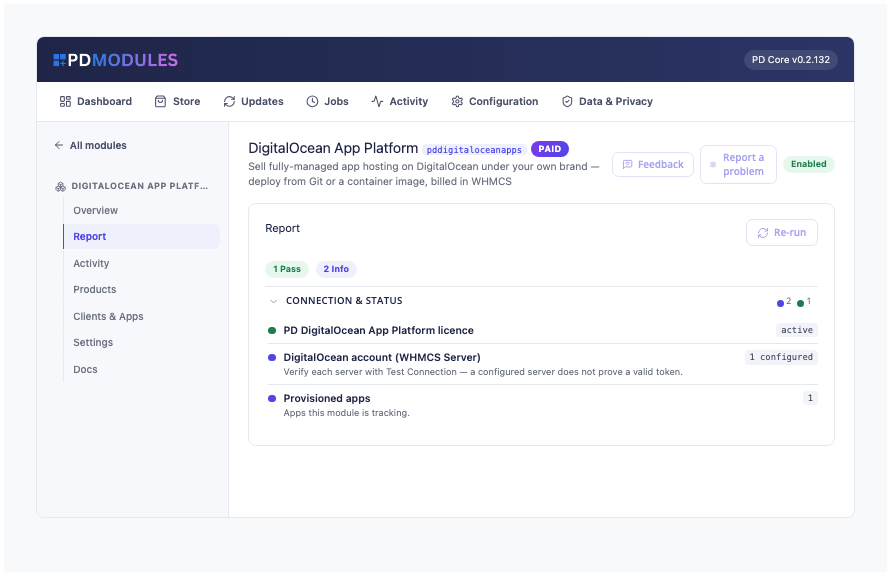
A health report on your licence and your DigitalOcean connection
Read-only assistant tools that report an app's state and list your apps
What your customers get
A live address: the app is served over https as soon as the first deployment is active, with a copy button
Change source to a new repository, branch or image, and redeploy, without opening a ticket
Redeploy now to build and roll out the latest code from the current source
An activity history that says what did not happen when an action fails or is still pending
Plan and instance changes through your upgrade option
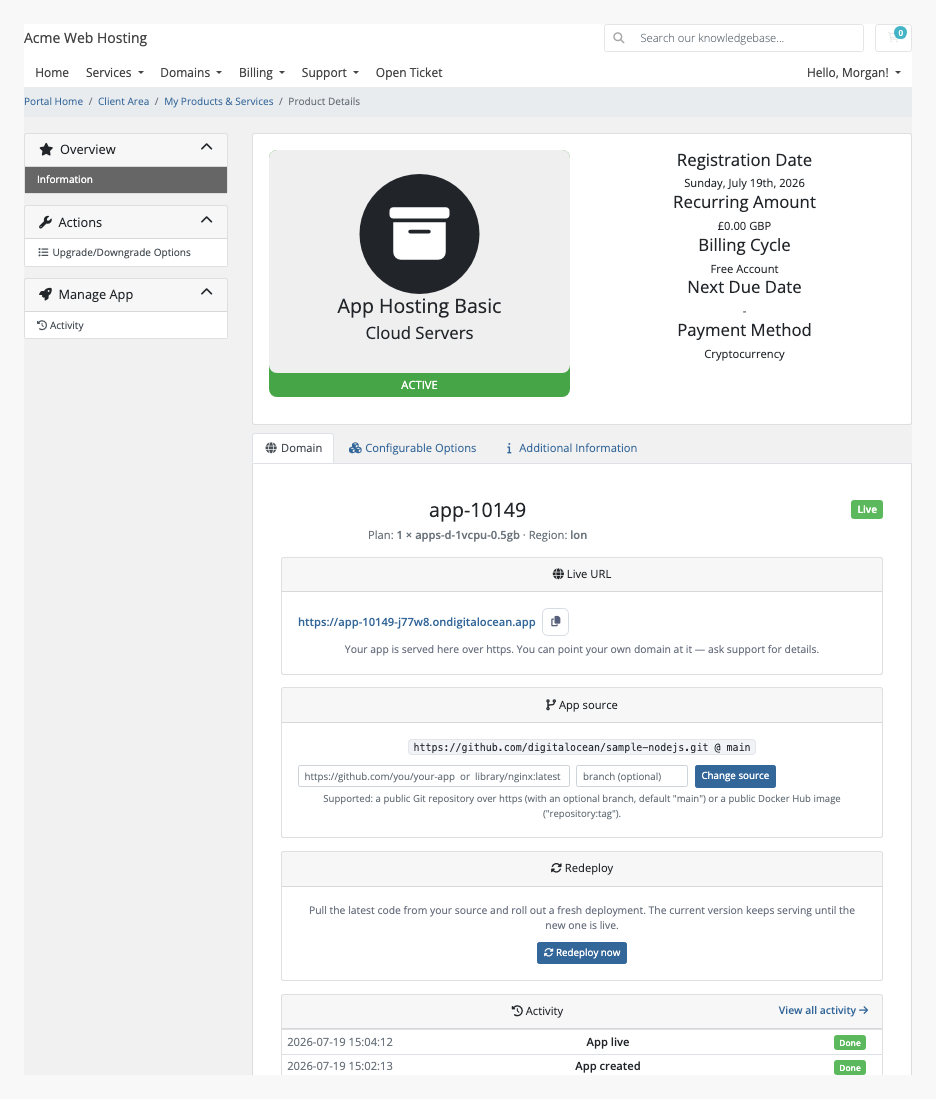
The same page on the Twenty-One theme: the pages render natively on whichever theme you use
Redeploy and Change source are each a switch on the product. Turn one off and the customer cannot use it. The pages render natively on WHMCS's Six, Twenty-One and Nexus themes, and every string can be translated or reworded with an override file that survives updates. Private repositories and private registries are not supported.
Security built in
Your API token is stored encrypted, is never shown to customers, and is sent only to DigitalOcean.
The DigitalOcean account is never exposed to customers, and the customer's panel does not name the provider in its own words.
A suspended customer can no longer redeploy or change the source until the service is unsuspended.
One product, every feature
PD DigitalOcean App Platform is one paid module with everything included. There are no add-on tiers and no per-app fees or cut from us: DigitalOcean bills you directly and you set your own price. It installs into PD Modules in one click and updates itself.
If your subscription ever lapses, your customers are not cut off. Running apps are never stopped, deleted or changed. Once a licence has expired, new apps are no longer provisioned while existing ones keep being managed, and customers can still redeploy. Only if it is later suspended does customer management pause, behind a neutral message. Teardown keeps running throughout.
Requirements
WHMCS 9 or later on PHP 8.2 or later, with the ionCube Loader
A DigitalOcean account and an API token with Full Access
PD Modules, the free control panel every PD module installs into
Questions
Where does the customer's code come from?
The customer supplies a public Git repository (with a branch) or a container image at checkout — or sets it from the client area after ordering.
Can customers redeploy after pushing new code?
Yes — one click from the client area triggers a fresh build and deploy.
Can customers scale their app?
Yes — through WHMCS Upgrade/Downgrade, which updates the instance size and count while preserving the source.
What happens when a service is terminated?
The app is deleted from your DigitalOcean account.
Do I need my own DigitalOcean account?
Yes. You resell on your own DigitalOcean account, at your own margin. Your API token is stored encrypted on your WHMCS server and is never shown to a customer.
Does a lapsed PD Modules licence break my customers' services?
No. A licence lapse withdraws the management layer in stages but never stops, deletes or alters a running customer resource. Your customers keep serving throughout.
What does it cost to run, on top of the subscription?
Only what you already pay your provider. PD DigitalOcean App Platform adds no per-unit fee and takes no cut — it connects to your own account with your own credentials, so the provider bills you directly at your rates, and you set what you charge your customers. From us it is the module subscription and nothing else.
What data leaves my server?
Your customers' data stays in your WHMCS. To confirm your licence, the platform sends us four things and nothing else: your licence key, the domain, your server's own IP address and the directory it is installed in — the four values recorded against your licence in your client area. Alongside that we see which module and version you run and whether its licence is healthy, so we can ship compatible updates. We never receive your clients' personal data, your credentials, or the contents of your WHMCS. Crash reports are off unless you turn them on, and a diagnostic report is only ever sent when you send one, after showing you a preview you can edit.
Which WHMCS and PHP versions does it need?
WHMCS 9 or later, on PHP 8.2 or later. It installs alongside whatever else you run — it adds its own tables and templates rather than modifying WHMCS files, so it does not collide with other vendors' modules or with a customised theme. Uninstalling removes its own tables and settings. Terminate its services and let their cleanup finish first — uninstalling also removes the record of any cleanup still in progress.
How do I get help?
Open a ticket from your client area, or use Get help inside the PD Modules panel, which attaches a diagnostic report — you see a preview of exactly what it contains, and can exclude any part of it, before anything is sent. Support is included with an active subscription; bug reports are welcome whatever your licence state.
What’s new in 0.1.84
Suspending a service now puts the app into maintenance mode: visitors see a maintenance page until it is unsuspended.
Removing the module no longer gets stuck on an order that never provisioned.
Region, plan and instance count that you set on a product and hide at checkout are now used for every app ordered, instead of the first choice on the list.
The menu label, the answers shown after pressing a button, the confirmation window and the wording in Activity can now all be translated or reworded.
The product settings page opens quickly even when DigitalOcean is slow to answer, and saving keeps the project you chose.
If DigitalOcean cannot be reached, the settings show the last project list with how old it is, or say the list could not be loaded.
Test Connection also refreshes that list.
See what DigitalOcean charges you for each app plan, in your own currency, beside your prices. Set an optional margin per product to get a suggested price and your margin per sale; Generate and Rebuild then write those prices. Nothing changes until you set one.
Suspend and Terminate always work, whatever the state of your PD Modules licence.
Product setup messages show screen names in bold rather than wrapped in asterisks.
Your admin list names the client paying for each app.
A checkout source that cannot be used is noted in the Activity, and the customer can always set the first source.
Setup steps use your billing system's own words.
Ordering again never creates a second app, and a plan that runs one instance is refused with more before anything is created.
Suspension locks redeploys and source changes until it is lifted, including through a plan change; your Client switches are enforced, not only hidden.
A deployment that fails is shown as failed, and requests show as requested until they land.
Test Connection checks the token you typed, and the settings check tests every connected account.
Activity says what did not happen when an action fails, instead of showing the success wording beside a Failed badge.
The Rebuild warning now says prices go back to their generated starting price (zero where none is suggested).
The PD Modules menu now names this module “DigitalOcean App Platform” in full.
The button that rebuilds a product's cart options now reads "Rebuild from DigitalOcean"; it named AWS by mistake.
The module's description in the Store is reworded and no longer names another company's product.
Setup guidance and connection checks name the right screens for your billing platform.
Generate this module's order options for a Blesta package in one click, as on WHMCS; rebuilding them keeps the choices your existing customers made.
Links on this module's screens open the right client, service and product pages on every platform.