PD Site Sentinel — Outside-In Security Monitoring for the Websites You Host
Watch your customers' websites from the outside, the way an attacker would
Made and supported by Projektif Digital Ltd. Runs inside PD Modules, the panel every module installs into.
Available for WHMCS and Blesta
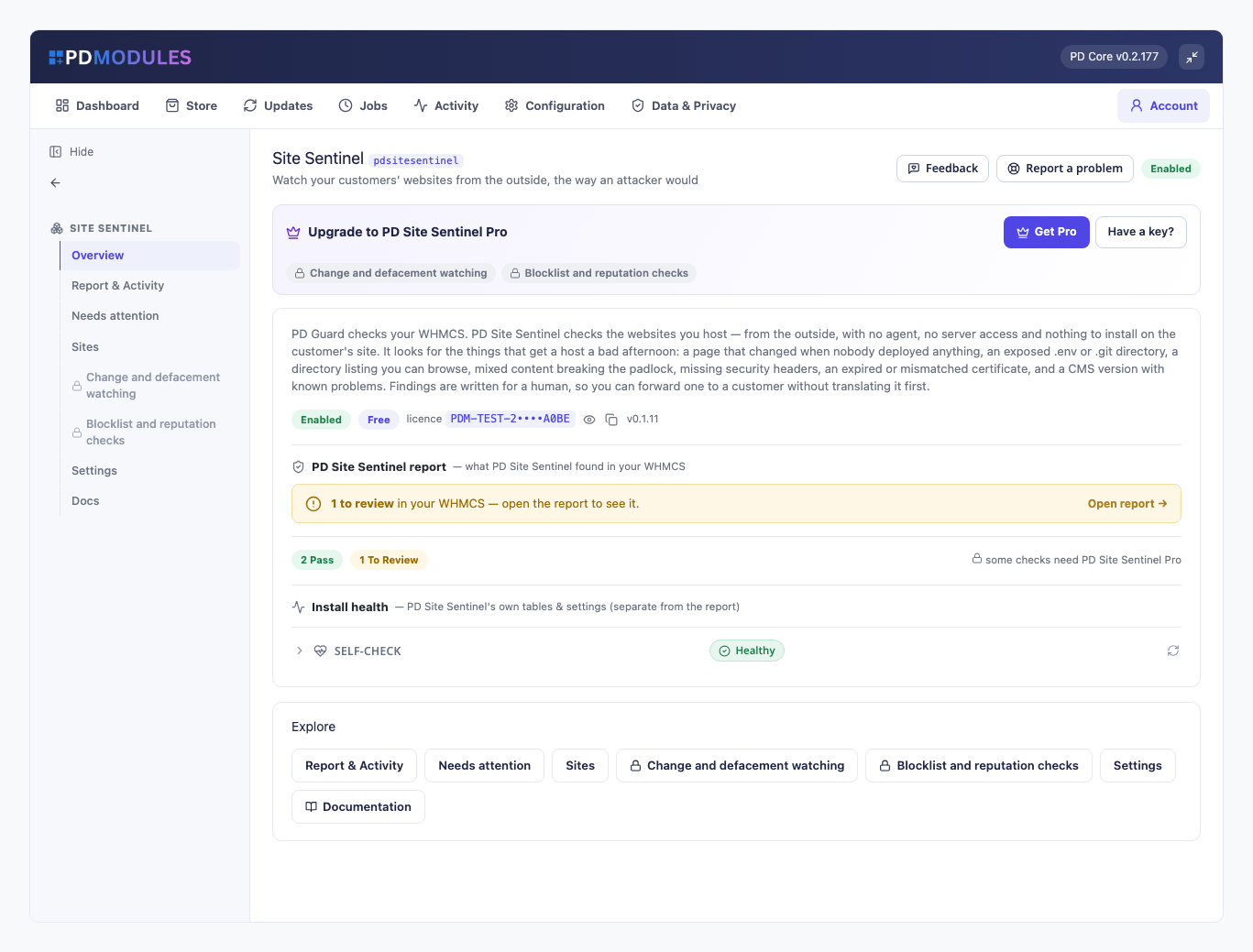
The customer's site was hacked three weeks ago. You found out today.
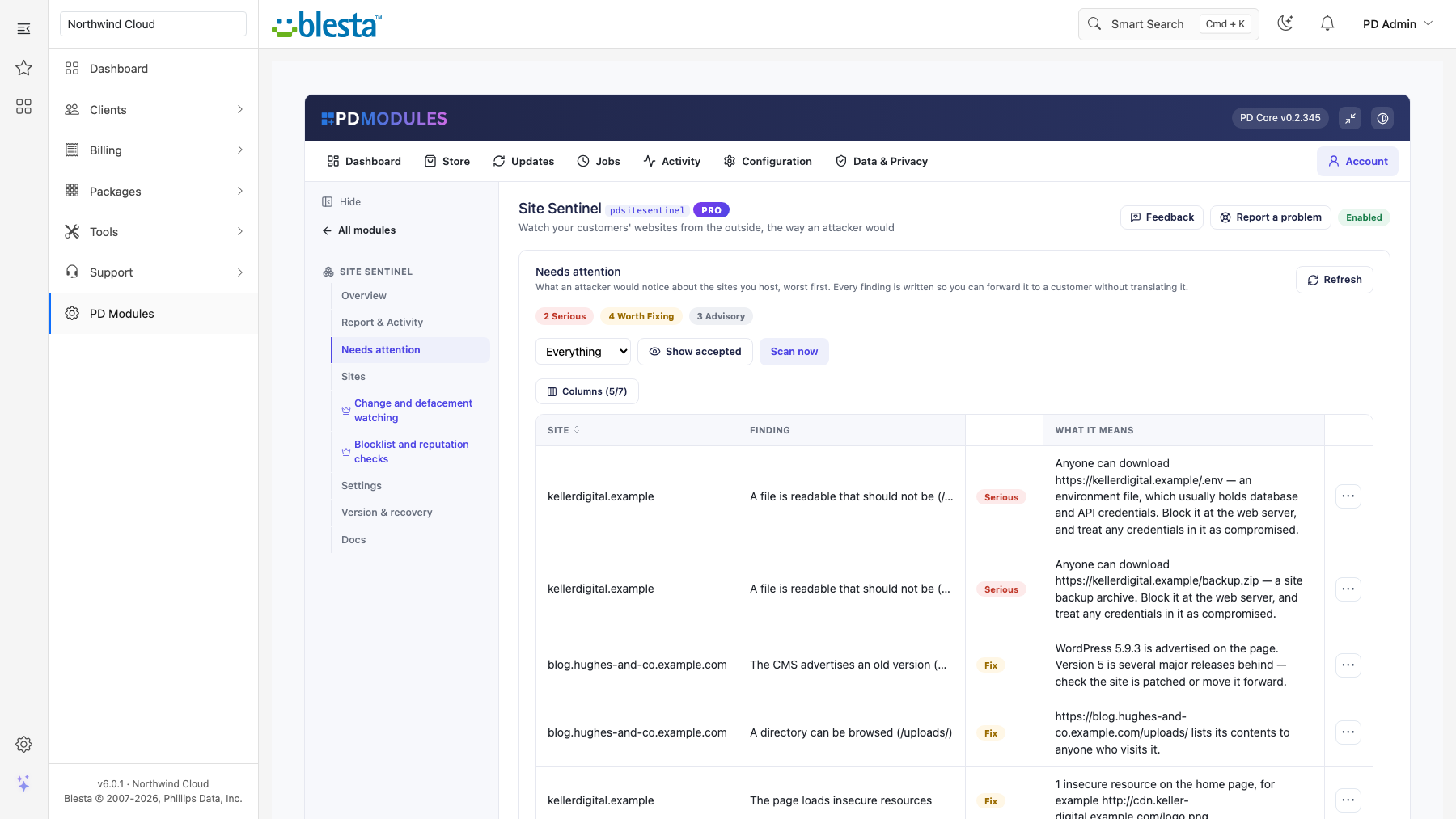
Not because anything was wrong with your server — because nobody was looking at the site from the outside. The .env file with the database password in it was downloadable. The /uploads/ folder listed its contents to anyone who asked. The home page had been quietly rewritten. All of it visible to anyone who typed the address.
PD Site Sentinel looks. No agent, no server access, nothing installed on the customer's site — just the same ordinary requests a visitor's browser makes, run against every site you host.
How it works
You install it. Hosting services enrol themselves.
The module looks at each site from the outside, the way a visitor or an attacker reaches it: expired or mismatched certificates, exposed admin panels and backup files, missing security headers, mixed content, out-of-date platforms. On Pro it fingerprints each page to catch a defacement and checks every site against Google Safe Browsing.
Your customer sees nothing unless you tell them — but you can, and "we checked your site and found nothing" is the most reassuring line you will send all month.
It never touches the site. Everything is read from the outside, so it works whether the site is on your server or somebody else's.
What it finds
- Files that should never be readable —
.env,.git/config, configuration backups, database dumps, site archives. These are the findings that become an incident if nobody spots them. - Directories anyone can browse, which hand an attacker a map of what is there.
- Certificate problems — expired, expiring within three weeks, or issued for a different hostname.
- Mixed content — the actual reason a customer says "my site says not secure".
- Missing security headers, with what each one is for.
- A CMS advertising an old version — flagged as the hint it is, never as a verdict.
- Pages that changed when nobody deployed anything (Pro) — the earliest outside sign of a defacement.
- Blocklistings (Pro) — before your customer's visitors see the red warning page.
Built not to cry wolf
A scanner people stop believing is worse than none. So:
- a 200 response is not enough to report an exposed file — the body has to look like the file, and anything served as HTML is treated as the error page it almost always is;
- mixed content counts resources, not links in body text;
- the page fingerprint strips scripts, comments, timestamps and counters, so a rotating banner or a visitor counter is not mistaken for a defacement;
- wildcard certificates are matched the way browsers match them — one label, not two;
- a site we could not reach produces one advisory note, never a page of findings.
Written for a human
Every finding says what it means and what to do, so you can forward one to a customer without translating it first. Your customers get a short summary on their own service page — reassurance when clean, something actionable when not, and the technical detail hidden unless you choose to show it.
Honest about what it is not
It cannot see inside a file it cannot read, so it does not pretend to be a malware scanner. It is the outside view: what an attacker, and Google, can see without any access at all.
Free, with a Pro tier
Ten sites with exposed-file, directory, certificate, mixed-content, header and CMS checks are free. Pro removes the limit and adds change watching and blocklist checks — an upgrade on the same licence, applied in place.
Questions
Which billing platforms does PD Site Sentinel work with?
PD Site Sentinel is available for WHMCS (8.13 or later) and Blesta (6.0 or later). Each has its own page with the screenshots, requirements and price for that system. A module is added to the PD Modules licence of the installation it runs on, so a WHMCS installation and a Blesta installation each hold their own licence.
Does this scan files on the server?
No. Everything is done from the outside with ordinary read-only web requests, exactly as a visitor's browser would. No agent, nothing installed on the customer's site, and no server access — which also means it works for a site you host on someone else's infrastructure.
Is this a malware scanner?
No, and it does not claim to be. It cannot see inside a file it cannot read. What it does see is the outside view: what an attacker and Google can find without any access at all — an exposed credentials file, a browsable directory, a defaced page, a blocklisting.
Will it flood me with false alarms?
That is the main thing it was designed against. A 200 response is not enough to raise an exposed-file finding — the body has to look like the file, and anything served as HTML is treated as an error page. Mixed content counts resources only. The page fingerprint ignores scripts, timestamps and counters. A site we could not reach produces one advisory note, not a page of findings.
A customer's site changes constantly and keeps alerting.
Turn off change watching for that one site on the Sites tab. Every other check keeps running.
Is it safe to scan customer sites?
Yes — a handful of ordinary GETs per site, spread across a batch. Nothing is exploited, written or brute-forced. You are checking sites on your own infrastructure for security problems, which is what a responsible host should do.
Why does the blocklist check say it is off?
Because no Google Safe Browsing API key has been supplied. Rather than skip the check silently and let an absence of findings look like a clean result, the module leaves it off and says so. Add a key in Settings and it starts working.
Should I show findings to my customers?
The summary, yes. The detail is off by default for a good reason: "your .env file is downloadable" in the client area is itself a disclosure, visible to anyone with access to that account. Turn it on for technical customers only.
What happens if Pro lapses?
Scanning continues as the free tier. Your sites and findings are kept; change watching and blocklist checks stop.
Does this expire, or turn into a paid version later?
The free tier never expires — it arrives with your PD Modules licence and keeps working, with no trial clock and nothing that switches off later. If you add Pro and then let it lapse, only the Pro features step down, in stages: a 14-day grace period where everything still works, then the Pro features lock and the module carries on as the free version. Nothing is deleted, nothing you configured is lost, and adding Pro again restores it immediately.
What does it cost to run, on top of the subscription?
Only what you already pay your provider, plus Pro if you add it. The free tier costs nothing and Pro is a flat subscription — neither takes a cut of your provider usage. PD Site Sentinel connects to your own account with your own credentials, so the provider bills you directly at your rates.
What data leaves my server?
Your customers' data stays in your WHMCS or Blesta. To confirm your licence, the platform sends us four things and nothing else: your licence key, the domain, your server's own IP address and the directory it is installed in — the four values recorded against your licence in your client area. Alongside that we see which module and version you run and whether its licence is healthy, so we can ship compatible updates. We never receive your clients' personal data, your credentials, or the contents of your WHMCS or Blesta. Crash reports are off unless you turn them on, and a diagnostic report is only ever sent when you send one, after showing you a preview you can edit.
How do I get help?
Open a ticket from your client area, or use Get help inside the PD Modules panel, which attaches a diagnostic report — you see a preview of exactly what it contains, and can exclude any part of it, before anything is sent. Support is included with an active subscription; bug reports are welcome whatever your licence state.
You might also need
 Featured
Stop fake signups & order fraud before they provision
Monitors that create themselves — every service you provision is watched from the moment it goes live
Prove the retainer is worth paying, automatically, every month
