PD Google Cloud Storage — Sell Google Cloud Storage as a Native WHMCS Product
Sell Google Cloud Storage under your own brand — provisioned, metered and billed in WHMCS
Made and supported by Projektif Digital Ltd.
Runs inside PD Modules, the panel
every module installs into.
Object Storage
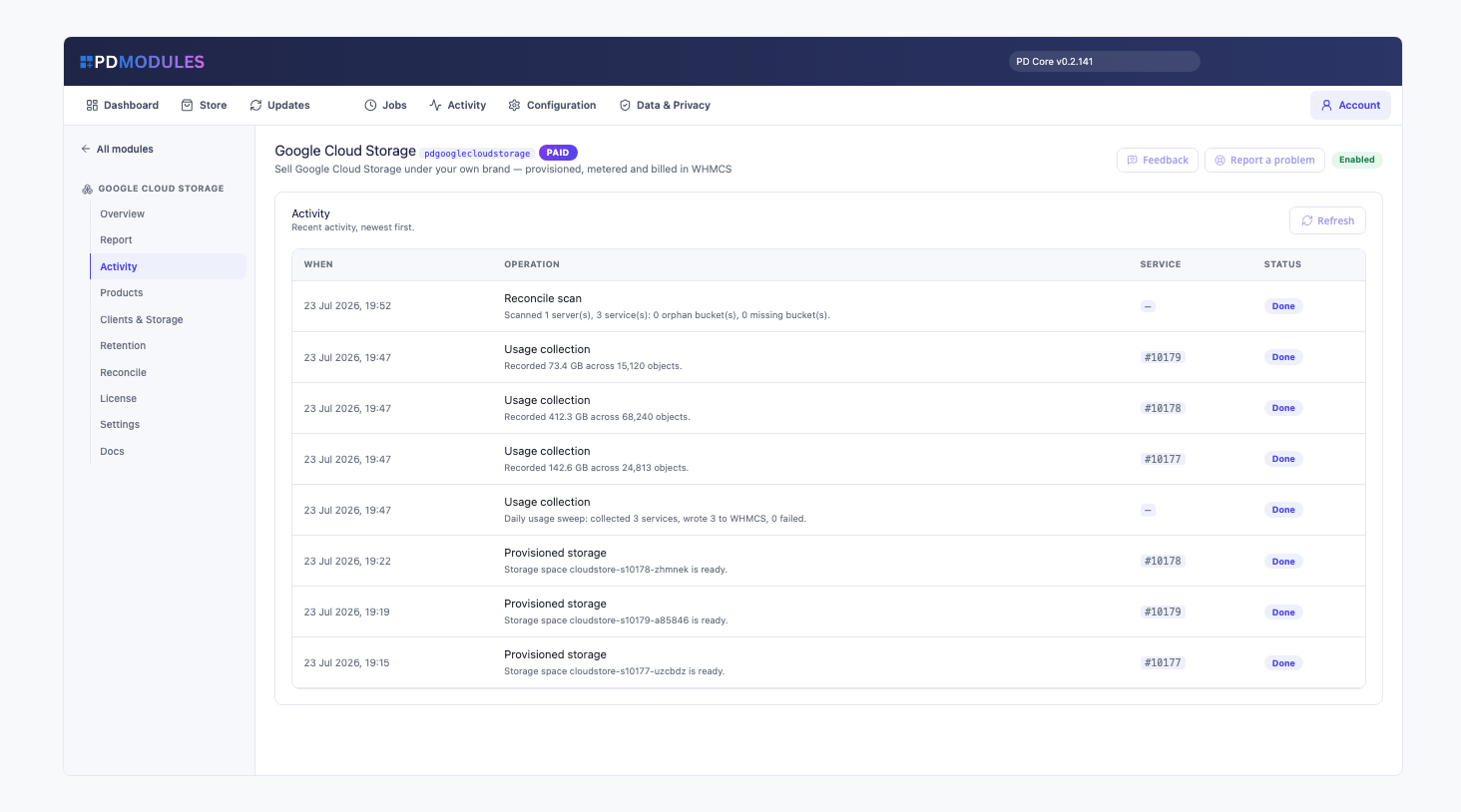
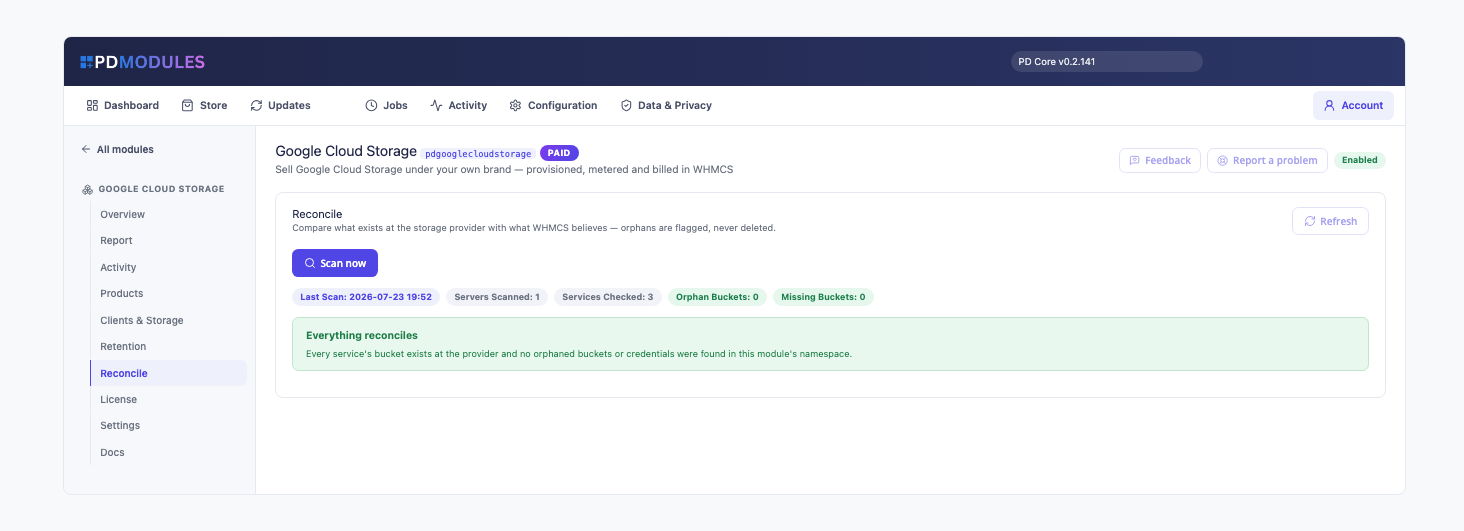
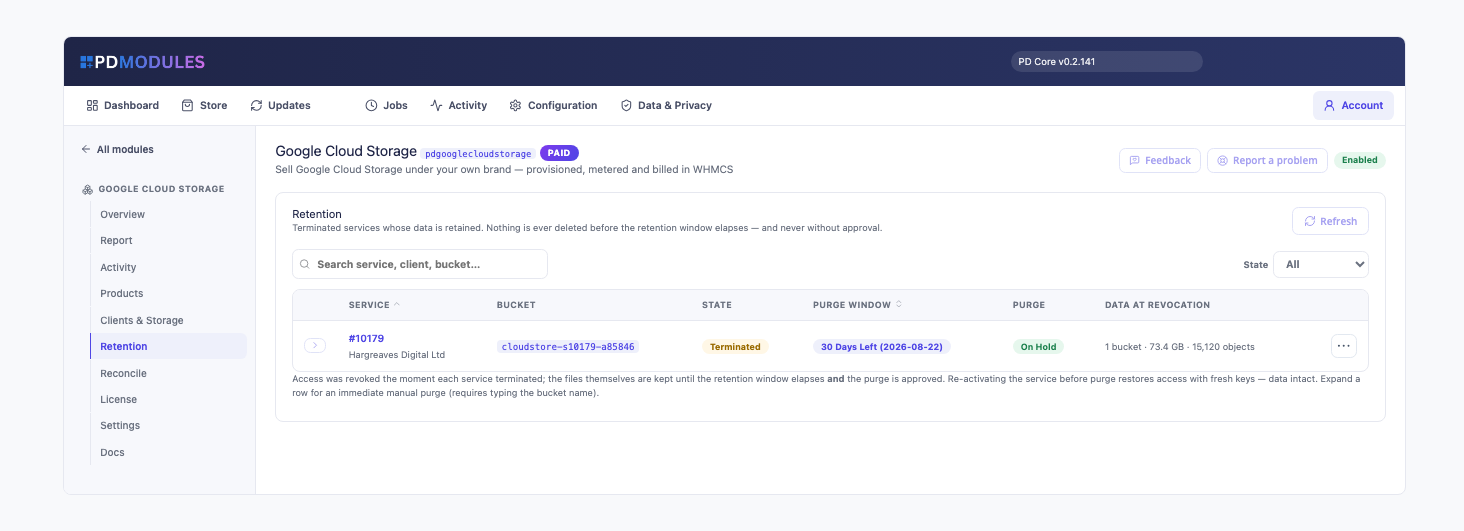
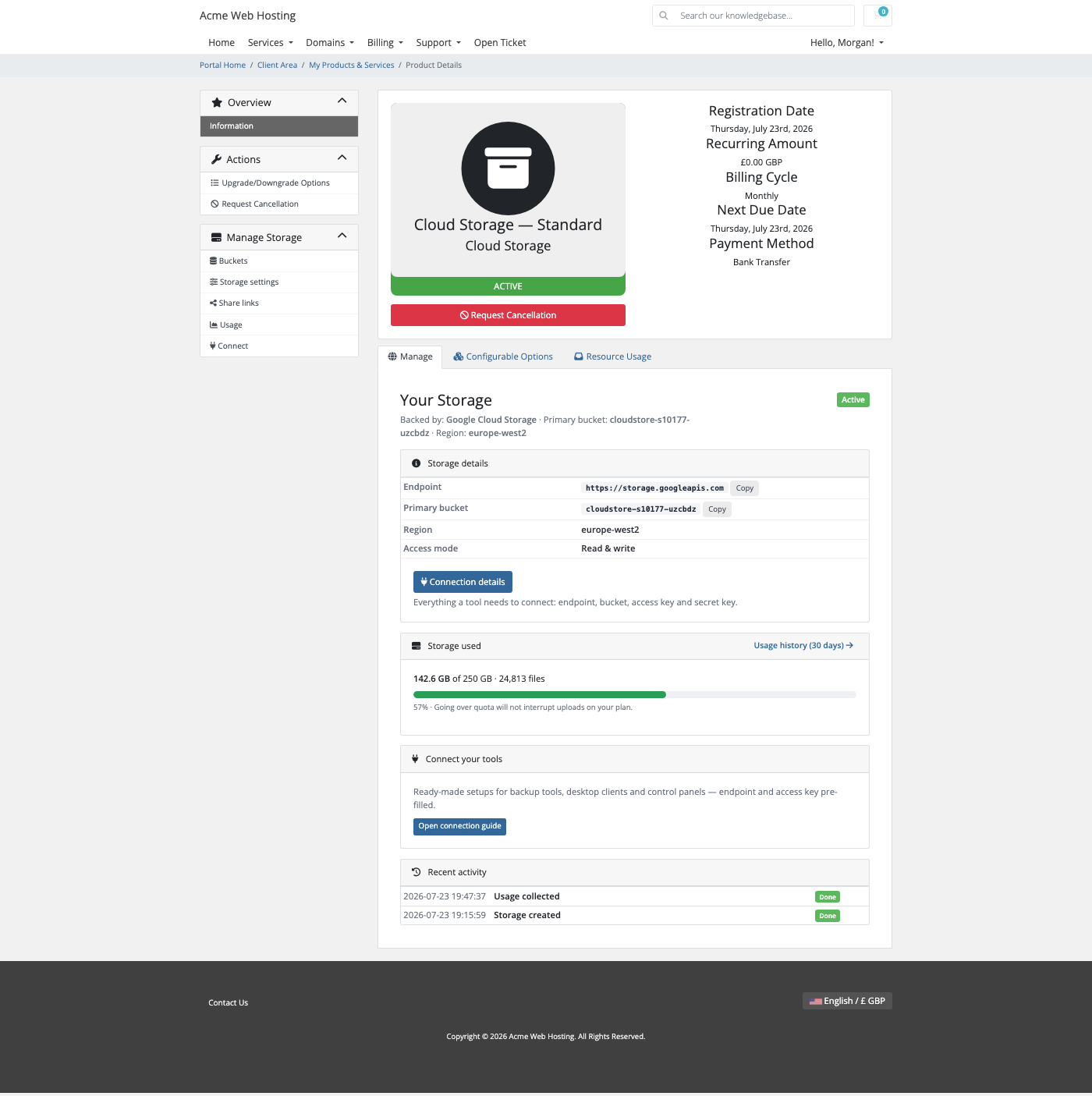
Turn any WHMCS product into a sellable storage plan — quota, buckets and versioning generated in one clickEvery customer's storage, usage and status at a glanceA health report confirms provisioning, billing and credentials are all in orderA full audit trail of every provisioning and lifecycle actionAutomatic reconciliation keeps WHMCS and Google Cloud perfectly in syncData-retention windows protect clients from accidental loss after cancellationYour customer's self-service storage dashboard with live usageCustomers create and manage their own buckets — no console neededPer-bucket versioning, lifecycle clean-up and CORS, all self-serviceA live usage graph drives native WHMCS overage billingPresigned share links let customers hand out time-limited access1 / 11
PD Google Cloud Storage lets a hosting company sell Google Cloud Storage as its own storage product. Your customer orders in your WHMCS cart, a private bucket with its own scoped access keys is created in your Google Cloud project within moments, and your customer manages it from your client area: connection details, buckets, versioning, clean-up rules, cross-origin access, share links and usage. You set the price, Google bills you for what is stored, and the difference is your margin.
It is built for hosts who want to offer Google-backed object storage without handing out Google Cloud access, without building a control panel, and without a ticket every time a customer needs a new bucket or key.
Why hosts choose PD Google Cloud Storage
A product, not a project. Every order gets its own bucket, its own dedicated service account and its own bucket-scoped access keys. Your customers never need a Google Cloud account, and you never create anything by hand.
Isolation Google enforces. A customer's keys cannot read, write or even list another customer's bucket, or anything else in your project. The boundary is enforced by Google, not by the module, so it holds even if a customer got hold of someone else's key. Each bucket is created with uniform bucket-level access.
Your customers choose where their data lives. The location is picked at checkout from Google's three multi-regions (US, EU and Asia) and the general-purpose regions across the Americas, Europe, Asia, the Middle East, Australia and Africa. Leave the option off and every order uses the default you set.
Works inside the project you already have. No dedicated project is needed. The module only touches the buckets, service accounts and access keys it creates itself.
Tools just work. Customers connect through Google's S3-compatible endpoint, so any tool that speaks the S3 API works with a custom endpoint and no changes.
Nothing is deleted by accident. Terminating a service revokes access at once but keeps the data through a retention window you choose, and nothing is purged without your approval unless you switch on automatic purging.
How it works
Create a service account in Google Cloud. Give it Storage Admin and Service Account Admin on your project and download its JSON key.
Connect it. Add a WHMCS server for the module and paste the key. Test Connection checks that Google can be reached and that customer keys can be issued, using a temporary probe it removes again.
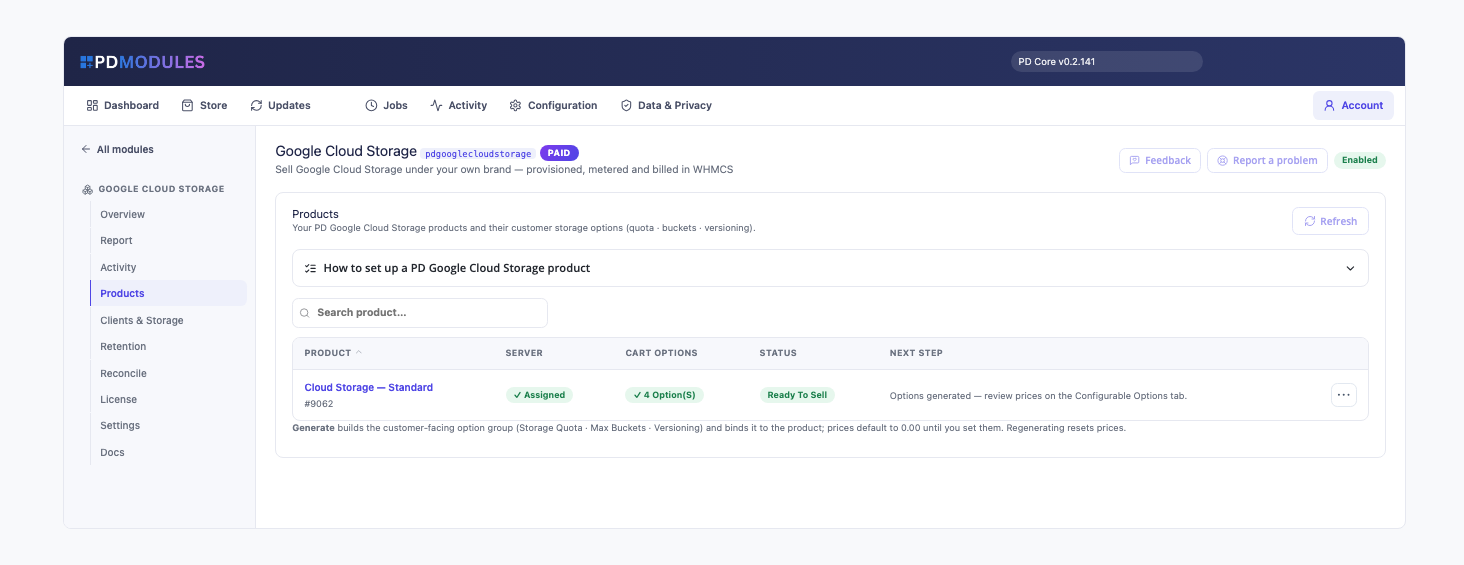
Create a product. One click generates the cart options (Storage Quota, Max Buckets, Region and Versioning) and you set the prices.
Your customer orders. Their bucket and keys are created, and their storage page is ready. WHMCS keeps billing as usual.
What you get in WHMCS
Selling and pricing
Generated cart options: Storage Quota, Max Buckets, Region and Versioning
Show or hide any option per product; hidden options use the product's defaults, and your prices are kept
Rebuilding the options keeps the choices existing customers already made
A default region for products with no region option
Daily usage readings written into WHMCS's disk-usage fields, so WHMCS's native usage display and overage billing can use them
Upgrades and downgrades through WHMCS's normal flow, with data preserved
More than one Google Cloud connection if you need them
Guided setup
A product overview that shows what each product still needs before it can go live
When a newer Google organisation blocks service-account keys by default, Test Connection recognises it and tells you the exact Console path to lift it
A clear message if you reach your project's service-account limit, pointing at the quota page
Running it day to day
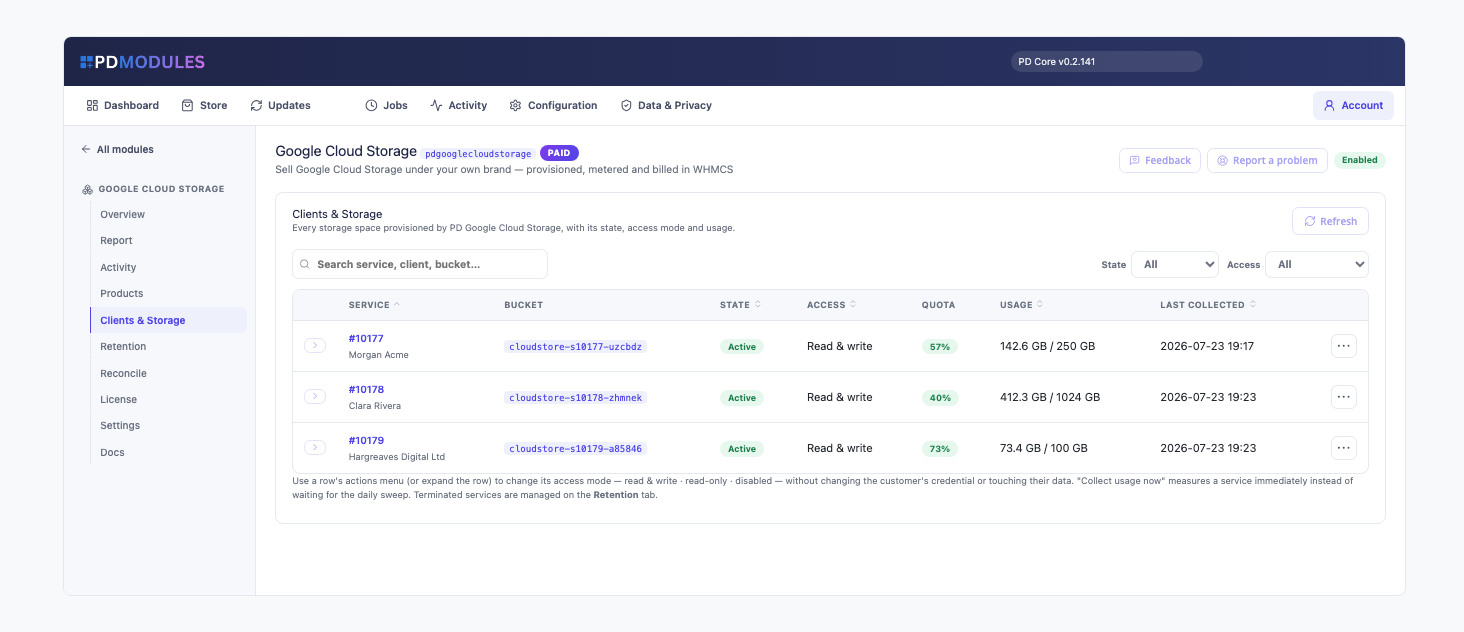
Clients & Storage lists every service with its client, state, access mode, quota and last usage reading
Change a service to read and write, read-only or disabled without touching the customer's keys or data
Suspend as read-only so customers can still download, or as disabled; unsuspending restores the previous access
Keep terminated data for 7, 14, 30, 60 or 90 days, or delete it straight away; purging is manual by default, and an immediate purge needs the bucket name typed
A read-only reconcile compares Google with WHMCS and flags what has no matching service
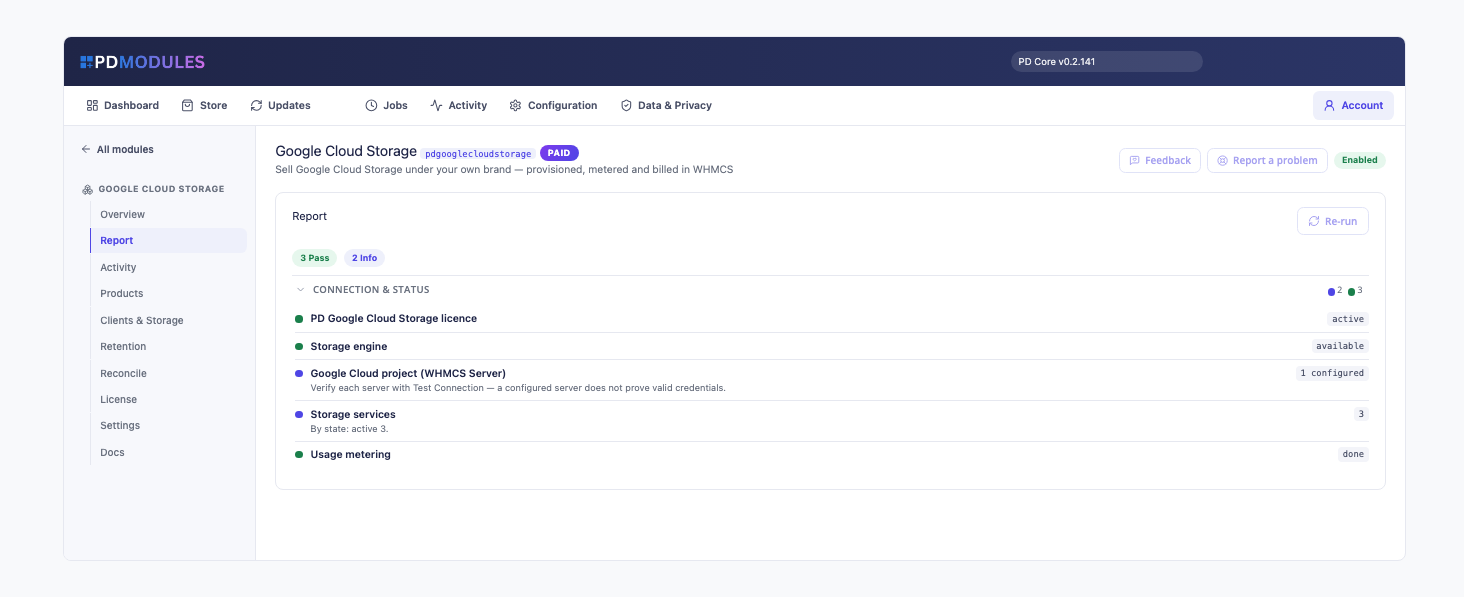
A health report, an activity log, and 80% and 100% quota emails you can switch off or copy to your administrators
What your customers get
Connection details: endpoint, bucket, location, access key and secret key, in your client area
Key rotation in one click: a new bucket-scoped key pair is issued in seconds and the old one is deleted at Google
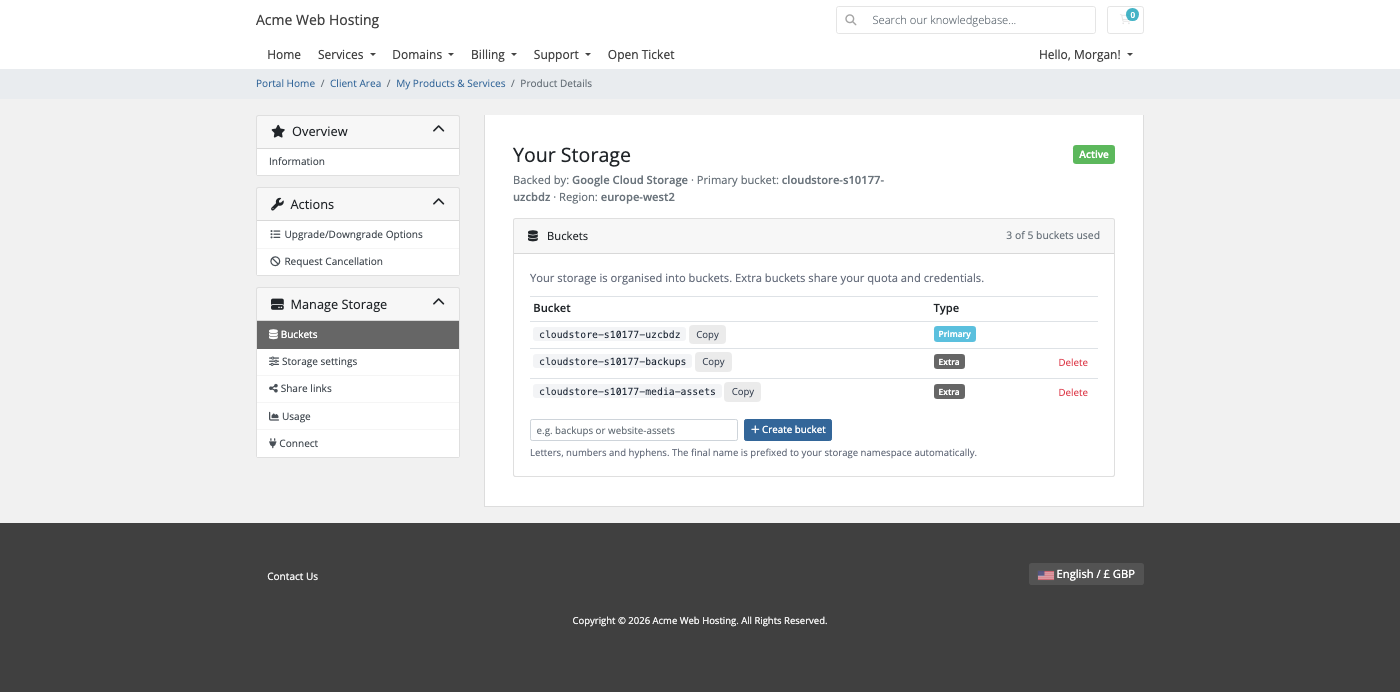
Their own buckets: create extra buckets up to their plan, and delete one only after typing its name
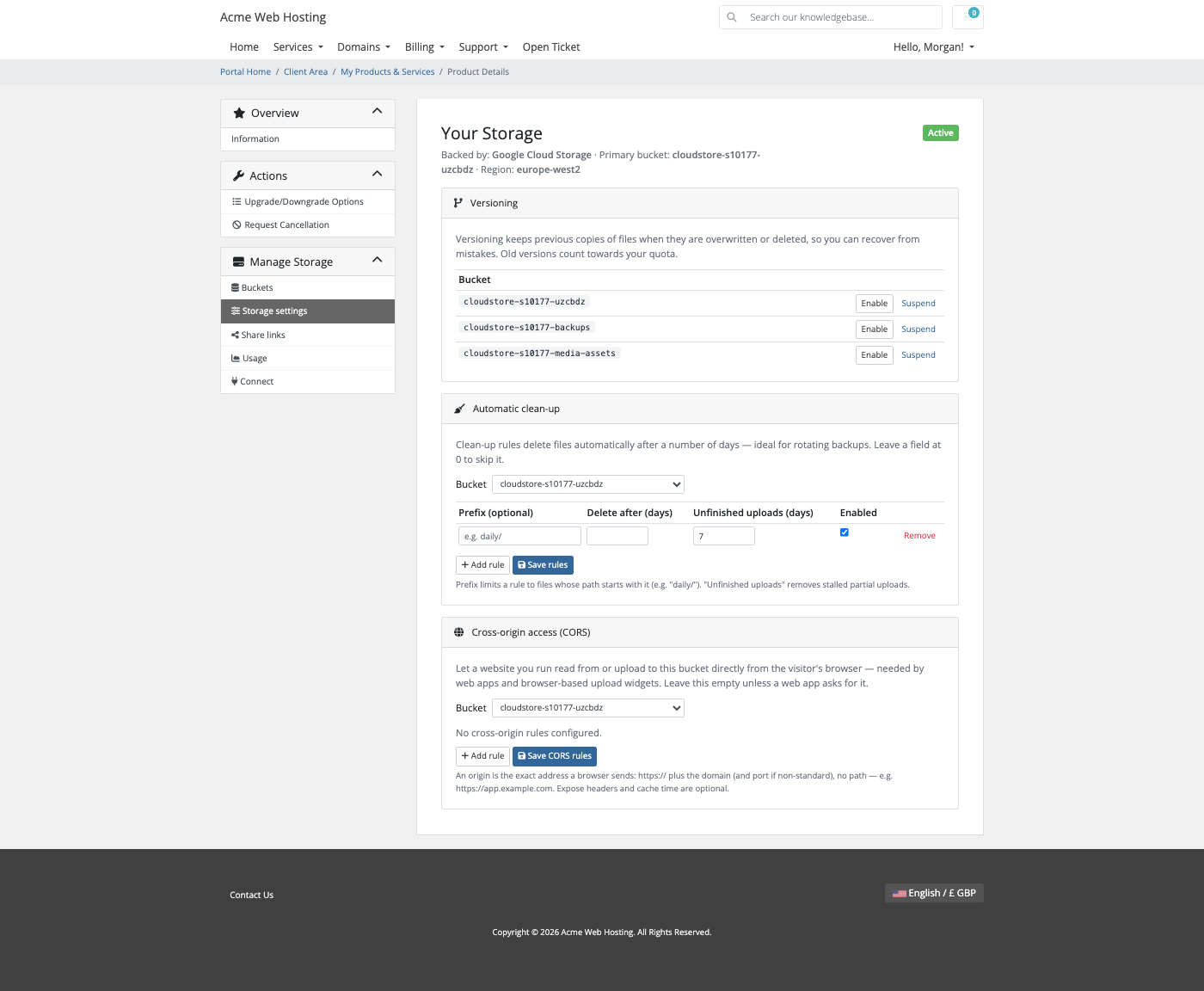
Versioning per bucket, so overwritten or deleted files can be recovered
Automatic clean-up rules to delete old files or stalled uploads after a number of days
Cross-origin (CORS) rules for web apps, taking effect within seconds, with no Google Console needed
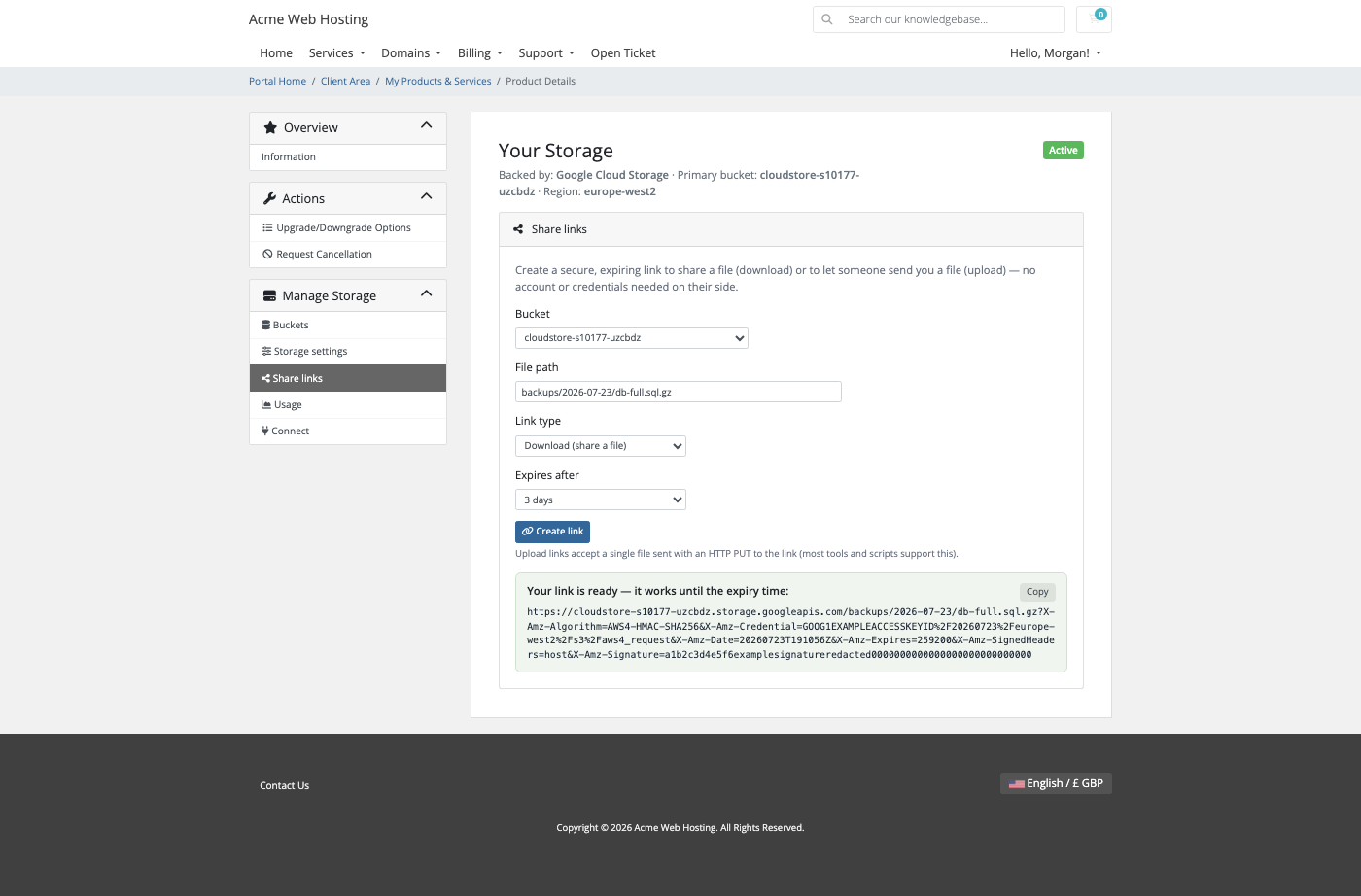
Share links: expiring download or upload links, without sharing keys
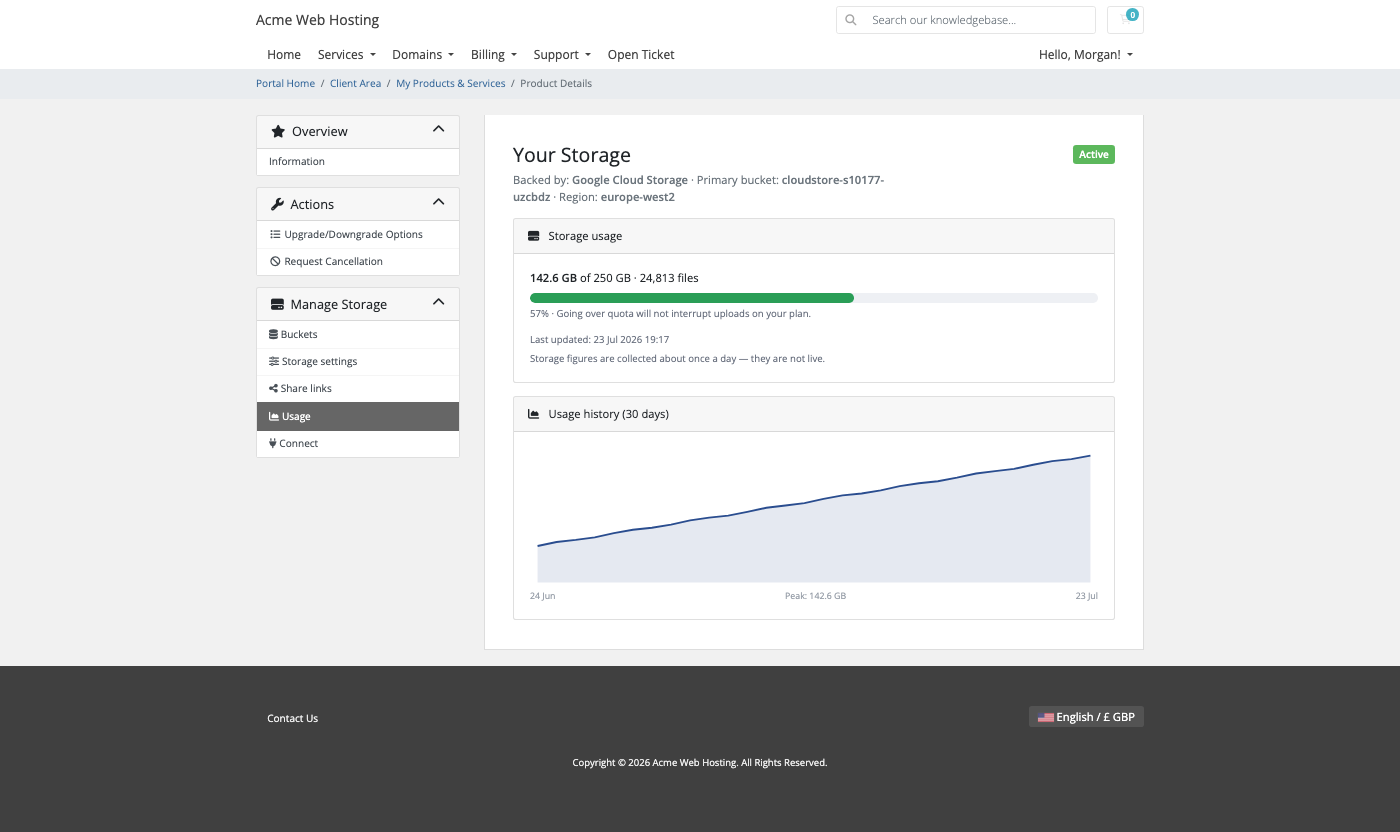
Usage: a usage bar, file count and 30-day graph
Ready-made setups for the AWS CLI, rclone, s3cmd, Cyberduck and WinSCP, cPanel backups and WordPress backup plugins
The customer's storage page in your client area: endpoint, location, live usage and recent activityBuckets: customers create and manage their own, within the limit of their planStorage settings: versioning, automatic clean-up and cross-origin rules, all self-serviceUsage: storage used against the quota, with a 30-day history
Bucket management, share links and storage settings are each a switch on the product. Turn one off and it disappears from the customer's page. The pages render on WHMCS's Six, Twenty-One and Nexus themes and are fully translatable.
On Google Cloud Storage, going over quota warns and shows in your admin panel but never pauses uploads, so a customer is never locked out of their own data. Old object versions count toward the quota.
Security built in
Your Google service-account key stays on your WHMCS server and is used only for Google Cloud API calls over HTTPS.
Customer access keys are stored encrypted.
Each customer has a dedicated service account, so one customer's key rotations never affect another's.
Terminating a service deletes its access keys and service account.
Nothing about your customers' data is sent to us: the module talks only to Google and to the PD Modules licence check.
One product, every feature
PD Google Cloud Storage is one paid module with everything included. There are no tiers to compare. It installs into PD Modules in one click and updates itself.
If your subscription ever lapses, nothing is deleted. You get a 14-day grace period with everything working, then admin management locks while customers keep their storage, and only after that do customer features pause, behind a neutral message that never mentions licensing.
Requirements
WHMCS 9 or later on PHP 8.2 or later, with the ionCube Loader
A Google Cloud project with billing and the Cloud Storage and IAM APIs enabled, and a service-account JSON key with Storage Admin and Service Account Admin
Outbound HTTPS from your WHMCS server to Google's APIs
PD Modules, the free control panel every PD module installs into
Questions
Do I need my own Google Cloud account?
Yes. You connect your Google Cloud credentials once and every client's bucket is provisioned into your account — Google bills you, you bill your client through WHMCS, and the difference is your margin.
How is each customer isolated?
Every order provisions its own bucket and a scoped credential that can reach only that bucket. Your master credentials never leave your server.
How does billing work?
A daily usage sweep writes real storage usage into WHMCS's disk-usage fields, so native overage billing, quota warnings and the usage graph work with no extra setup.
What happens when a customer hits their quota?
Uploads pause while downloads keep working, so nothing is lost — the client just tops up or upgrades to continue.
Is data ever deleted automatically?
No. Suspension makes the bucket read-only and termination retains data for a window you set; permanent purges are approval-gated with a typed confirmation.
Can customers upgrade or downgrade?
Yes, through WHMCS's normal Upgrade/Downgrade flow, with data preserved in both directions.
What’s new in 0.1.43
Fixed: the Products screen listed nothing when the products were there. It now finds every product this module provisions, whichever billing system you run.