PD DigitalOcean OpenSearch — Sell Managed OpenSearch as a Native WHMCS Product
Sell managed OpenSearch clusters on DigitalOcean under your own brand — provisioned, billed and managed in WHMCS
Made and supported by Projektif Digital Ltd.
Runs inside PD Modules, the panel
every module installs into.
Databases
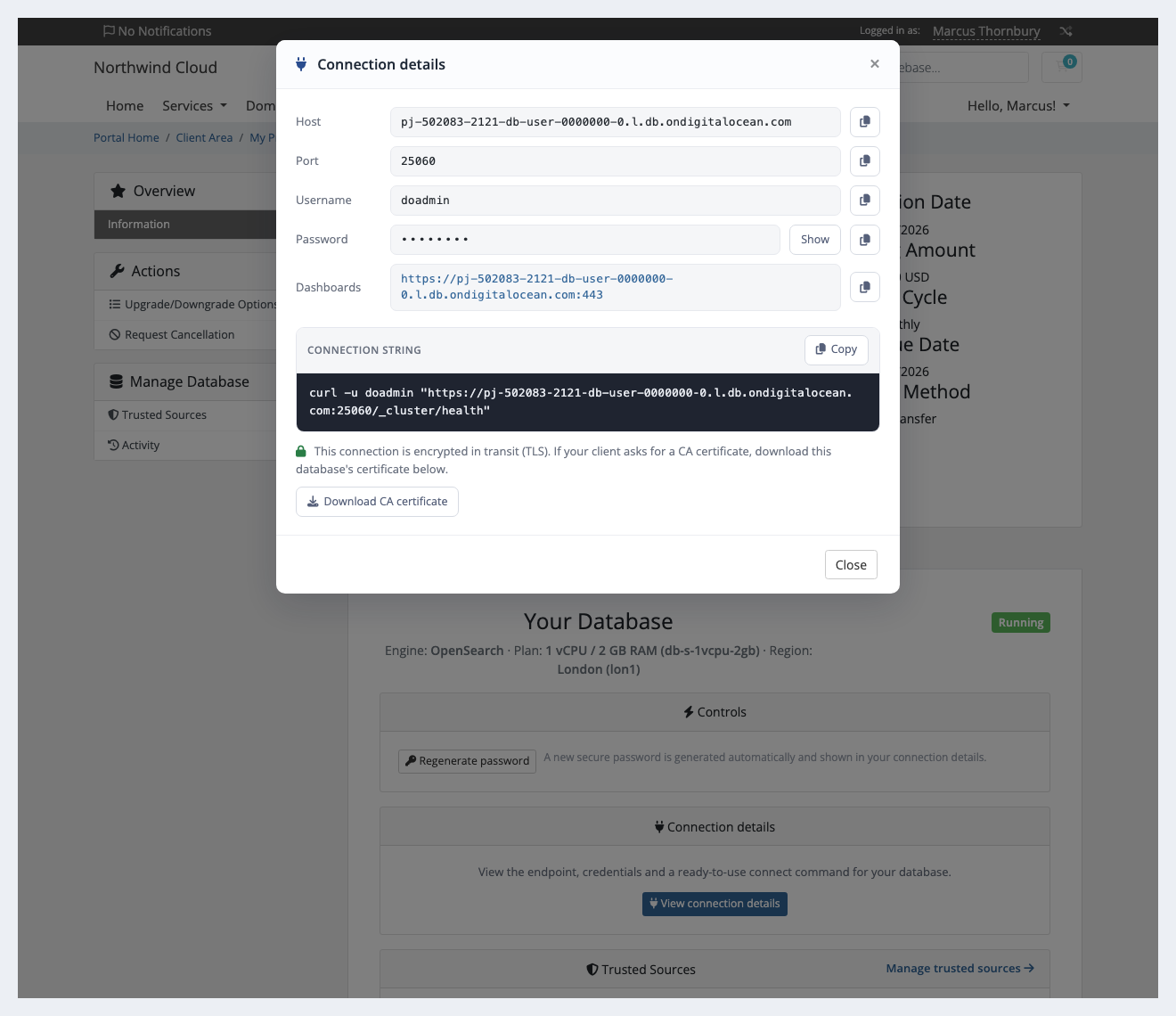
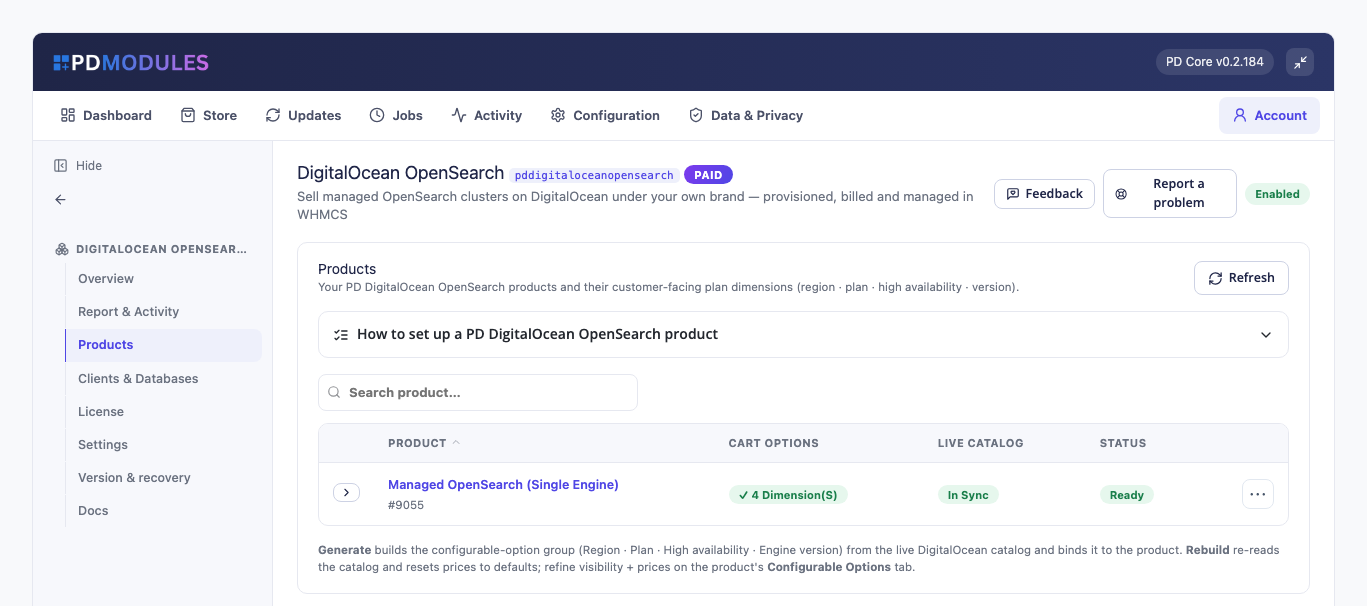
Connection details — copy the ready-to-use curl connect string for your managed OpenSearch.One-click OpenSearch setup with checkout options generated from the live DigitalOcean catalog.1 / 2
PD DigitalOcean OpenSearch lets a hosting company sell DigitalOcean managed OpenSearch as its own search and log-analytics product. Your customer orders in your WHMCS cart, a dedicated OpenSearch cluster is built on your DigitalOcean account, and your customer manages it from your client area with your branding and no DigitalOcean login. You set the price and keep the margin over what DigitalOcean bills you.
OpenSearch is what customers use for full-text search on their sites, for log analytics and for observability dashboards. It is for hosts whose customers have outgrown a search plugin or a log file and want a real search cluster, managed, without running one themselves.
Why hosts choose PD DigitalOcean OpenSearch
Dashboards on the page. OpenSearch customers are shown their OpenSearch Dashboards address beside their connection details, with a Copy button, so they can open the interface without hunting for the URL.
A health-check command ready to paste. The connect command is a curl call to the cluster's health endpoint, which proves the credentials, the address and the encrypted connection in one step.
Clusters that can fail over. High availability provisions a three-node cluster, offered as a checkout option you price yourself. The customer's page says how many nodes they have.
A dedicated cluster per customer. Each order builds its own OpenSearch cluster in the region, plan and version the customer chose. Nothing is shared between tenants, which matters when the data is logs.
Access control without tickets. Customers add and remove the addresses allowed to connect, and changes apply within a minute. Until they add one, the page says plainly that the database accepts connections from any address.
Nothing left billing. Cancelling deletes the cluster at DigitalOcean and confirms it is gone.
How it works
Connect your DigitalOcean account. Add your DigitalOcean API token once on a WHMCS server record, using a token with Full Access, then press Test Connection.
Create your product. Create a product with the module and pick OpenSearch as the Engine, then set a default region, plan and name prefix. Switch on automatic setup so a paid order provisions by itself.
Generate the checkout options. Open the module's Products page and press Generate. It builds the product's Region, Plan, High availability and Engine version options from DigitalOcean's live catalogue, all priced at zero for you to set.
Your customer orders. They choose their options and pay. The cluster is built on your DigitalOcean account in the background, and the connection details appear on their own once it is online, usually within a few minutes.
You get paid, they manage it. WHMCS keeps billing as usual, and the customer copies the connect command and sets their own trusted sources.
What you get in WHMCS
Selling and pricing
Checkout options for OpenSearch generated from DigitalOcean's live catalogue: Region, Plan, High availability and Engine version
Plans quoted as vCPU and RAM with storage included
Versions read live from DigitalOcean; a blank version means DigitalOcean's default
High availability as a priced checkout option, giving a three-node cluster
Generated choices start at zero in every currency and you price each one under System Settings → Products/Services → Configurable Options; a sync never changes a price you have set
Choose which choices customers see at checkout; anything hidden uses your product's default and keeps its price
Clusters are named with your own prefix and the service number
Provisioning you can trust
A paid order creates a dedicated OpenSearch cluster on your own DigitalOcean account, with no step by you
High availability provisions a three-node cluster
An order DigitalOcean would refuse is stopped with a clear message before anything is created; Atlanta, Richmond and Kansas City carry only Premium plans
Every cluster is recorded before DigitalOcean is asked to create it, and pressing Create again never builds a second one
A provisioning failure appears in the service's activity with its reason, never left at "Provisioning"
A plan change through WHMCS's own upgrade flow resizes the running cluster in place; host, port and data are kept
Suspend replaces the trusted sources with a rule nothing matches: the cluster keeps running (DigitalOcean still bills it), the data is untouched, and the customer cannot lift the lockdown. Unsuspend restores exactly the sources saved
Terminating deletes the cluster at DigitalOcean with its users, databases and backups, and confirms it is gone. There is no retention period, so tell customers to take their own backup first
OpenSearch, specifically
The connection details include a Dashboards address with its own Copy button, next to host, port, username and password
The ready-to-use command is a curl call to the cluster health endpoint over HTTPS
Every cluster enforces TLS in transit, and the CA certificate is a download for clients that ask for one
There is no Backups page for OpenSearch: the module lists backups only for engines where DigitalOcean provides a list
Running it day to day
A Clients & Databases panel lists every cluster against the service paying for it, with engine, plan, region, endpoint and state
An Activity panel records every provisioning and lifecycle action with its outcome
A report shows your licence, whether a DigitalOcean account is connected and how many databases you run
A cluster deleted outside your billing system is flagged to you
What your customers get
The client area has Overview, Trusted Sources, Backups (where the engine lists them) and Activity under a Manage Database menu.
Connection details in one window: host, port, username and password (masked until Show, with Copy beside each), plus a ready-to-use curl command that checks the cluster's health
The CA certificate as a download, for clients that ask for one; the connect command already uses TLS
Regenerate password in one click behind an in-page confirmation; the new password appears in the connection details
Trusted sources: add and remove the IPv4 addresses and ranges allowed to connect, with bad entries refused and changes applied within a minute
Recent activity: their latest actions, up to 40, each marked done or not
Cluster layout in plain words: how many standby nodes a highly available database has
Connection details for an OpenSearch cluster: masked password, the Dashboards address, a ready curl command and the CA certificate download
The firewall, connection details and backups pages are each a switch on the product: turn one off and it is hidden and refused. The client area renders natively on WHMCS's Six, Twenty-One and Nexus themes, and every line of customer text is translatable, with overrides that survive updates.
Security built in
Your DigitalOcean API token is stored encrypted, only ever sent to DigitalOcean, and never shown on a customer page or in a customer message.
Each database password is stored encrypted and shown only to the signed-in owner of that service.
Every customer action needs a signed-in owner of the service and a valid security token.
When something fails at DigitalOcean, the customer sees a neutral message and the reason goes to your activity log.
One product, every feature
PD DigitalOcean OpenSearch is one paid module with everything included: provisioning, the Dashboards address, high availability, trusted sources and password reset. There are no add-on tiers to compare. It installs into PD Modules in one click, updates itself, and uninstalls cleanly: its own tables and settings are removed and no WHMCS files are modified.
If your subscription ever lapses, your customers are not cut off. A running database is never stopped, deleted or altered. New provisioning and admin configuration lock first, customers see a neutral "temporarily unavailable" message with their connection details still visible, and cancellations still complete. Renewing restores everything with nothing lost.
Requirements
WHMCS 9 or later on PHP 8.2 or later, with the ionCube Loader
A DigitalOcean account with billing enabled and an API token with Full Access
WHMCS's automation cron running, which finalises new clusters and confirms cancellations
PD Modules 0.2.322 or later, the free control panel every PD module installs into
Questions
What version of OpenSearch do customers get?
Whichever versions DigitalOcean currently offers for OpenSearch — the list is read live from DigitalOcean. If you expose the Engine version dimension at checkout, the customer chooses; otherwise they get your product default.
Can customers upgrade their plan later?
Yes — through WHMCS's normal Upgrade/Downgrade flow. The cluster is resized in place and the data is preserved, with no migration.
How do customers secure who can connect?
From the Trusted Sources page in their client area. They add their application servers' IP addresses; once any are added, only those can connect. Every connection also enforces TLS.
What happens to the data when a service is cancelled?
Terminating deletes the cluster on DigitalOcean and cleans up every associated resource — zero orphans left billing on your account. Take a backup first if you need to retain data beyond cancellation.
Do I need my own DigitalOcean account?
Yes. You resell on your own DigitalOcean account, at your own margin. Your API token is stored encrypted on your WHMCS server and is never shown to a customer.
Does a lapsed PD Modules licence break my customers' services?
No. A licence lapse withdraws the management layer in stages but never stops, deletes or alters a running customer resource. Your customers keep serving throughout.
Which WHMCS and PHP versions does it need?
WHMCS 9 or later, on PHP 8.2 or later. It installs alongside whatever else you run — it adds its own tables and templates rather than modifying WHMCS files, so it does not collide with other vendors' modules or with a customised theme. Uninstalling removes its own tables and settings and leaves no orphans behind.
How do I get help?
Open a ticket from your client area, or use Get help inside the PD Modules panel, which attaches a diagnostic report — you see a preview of exactly what it contains, and can exclude any part of it, before anything is sent. Support is included with an active subscription; bug reports are welcome whatever your licence state.
What’s new in 0.1.87
A database whose setup did not complete now tells your customer so on their service page, instead of saying it is still being set up. Pages for a database being resized or removed now say that too.