PD Azure MySQL — Sell Managed MySQL Databases on Microsoft Azure from WHMCS
Sell managed MySQL databases on Microsoft Azure under your own brand — provisioned, billed and managed in WHMCS
Made and supported by Projektif Digital Ltd.
Runs inside PD Modules, the panel
every module installs into.
Databases
One-click configurable options — Region, Plan, Storage and Engine version generated straight from the curated Azure catalog, priced and ready to sell in minutes.Every customer's managed MySQL server at a glance — engine, storage, region and live state, across your whole book of business.A complete audit trail — every provisioning action, password reset and trusted-source change logged automatically for support and compliance.One-click connection details — SSL/TLS endpoint, credentials and a ready-to-paste mysql command, with no Azure portal access required.Customer-managed trusted sources — your clients open access to their own application servers themselves, without opening a support ticket.Self-service databases — customers create and remove their own MySQL databases straight from their WHMCS account.A transparent history of every change — customers see exactly what happened to their database and when, cutting support tickets.1 / 7
PD Azure MySQL lets a hosting company sell Azure Database for MySQL, Microsoft's managed MySQL service, as its own database product. Your customer orders in your WHMCS cart, a dedicated MySQL server is built in your Azure subscription, and your customer manages it from your client area: connection details, an allowed-address list and their own databases, with no Azure portal and no mention of Microsoft. You set the price, Azure bills you the cost, and the difference is your margin.
It is built for hosts whose customers run MySQL-backed sites and applications: WordPress and WooCommerce stores, Magento, custom PHP and agency client projects. They want a database that is managed, backed by Microsoft and not tied to one web server, and they want to buy it from the company that already hosts their site.
Why hosts choose PD Azure MySQL
MySQL, the database your customers already use. Sell MySQL 8.4 (the default) or 8.0, chosen at checkout or fixed per product. Plans span the Burstable, General Purpose and Memory Optimized tiers, so a small shop and a busy store can both be sold the right size.
Customers choose where it lives. Offer 30 or more Azure regions worldwide. A region your subscription cannot create MySQL servers in is refused in plain words before anything is created, never after a customer has paid.
Every order sets itself up. A paid order builds a dedicated Flexible Server inside its own resource group, with the plan, storage, version and region the customer picked. Provisioning runs in the background with a progress state, and the connection details appear on their own once Azure reports the server ready.
Isolated by design. Each service has its own server and its own resource group. Nothing, not the server, the credentials nor the access rules, is shared between customers.
Disks that do not fill up. Storage auto-grows before the disk fills, so a full disk never takes a customer's database down. Storage upgrades grow online without touching data.
Nothing left billing. Terminating a service deletes its whole resource group, the server, its rules and its databases, and the module confirms the group is gone. A termination completes even if your own subscription has lapsed, so a cancelled server never keeps billing.
How it works
Connect your Azure subscription. Register an app in Microsoft Entra with the Contributor role and paste its credential once on a WHMCS server record. Test Connection checks the sign-in, that the app can read the subscription and that the MySQL resource provider is registered, and shows the exact fix if it is not. Nothing is created.
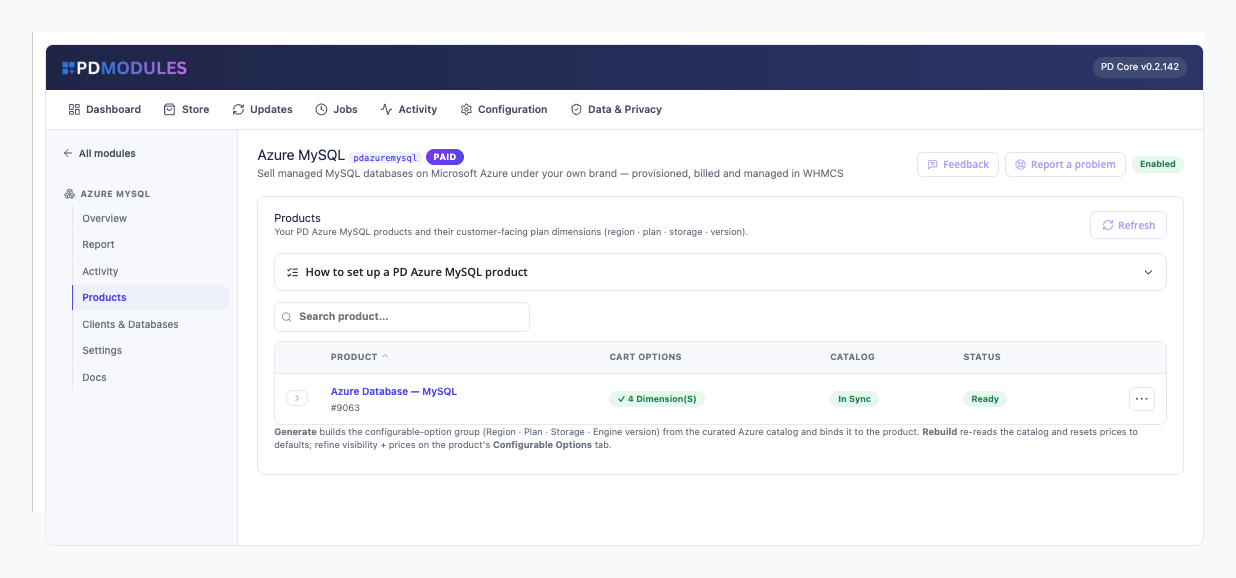
Create your product. Choose the Other product type and switch automatic setup on, then set a default region, plan, version and storage. One click generates the Plan, Region, Storage and Engine version options for the cart, each at price zero.
Set your prices. You price every option on WHMCS's Configurable Options screen. Prices you set survive a sync, and Rebuild from Azure warns you before it returns them to the starting price.
Your customer orders. They choose their options and pay. Their server is built and their page shows progress until it is ready.
What you get in WHMCS
Selling and pricing
Plan, Region, Storage and Engine version generated as cart options from a catalogue checked against Microsoft's published lists
You choose which options customers see at checkout. A hidden one uses the product default, and its prices are kept
Rebuilding a product's options keeps the choices existing customers already made
Plan and storage upgrades go through WHMCS's own upgrade flow and resize the server in place, with a brief restart and the data kept. An upgrade that changes both applies both
Azure never shrinks storage, so a smaller disk is refused with a clear message
A resource name prefix of your choice, so servers read as <prefix>-<service id> in Azure
Provisioning you can trust
If Azure refuses an order, you see Azure's own reason in the service's activity and the customer is never left on "creating"
Running Create again never builds a second server or leaves the first one billing
Suspending stops the server so compute billing pauses, while storage and backups keep billing and the data is untouched. Azure restarts a stopped MySQL server after about 30 days, and a scheduled check stops it again
Unsuspending starts it again, and queues the start if Azure is still busy
A server deleted outside WHMCS is flagged to you in the activity log, and your billing is never changed by it
When a failure is on your side, such as an expired Azure secret, the customer sees a neutral message and you get the detail
Running it day to day
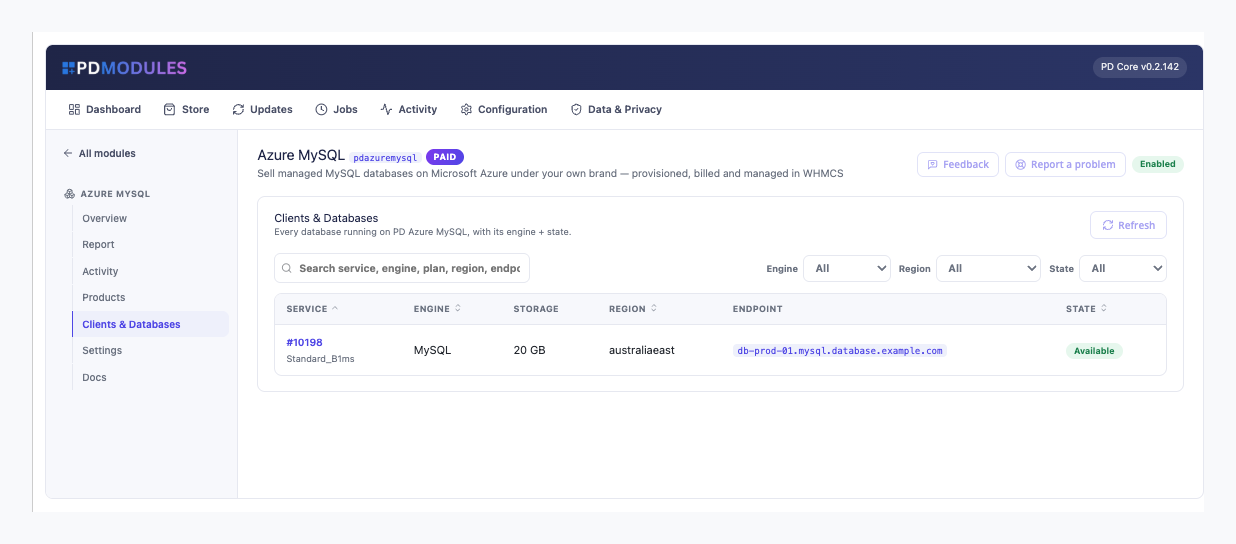
Clients and Databases: every server with its service, region, plan, endpoint and state
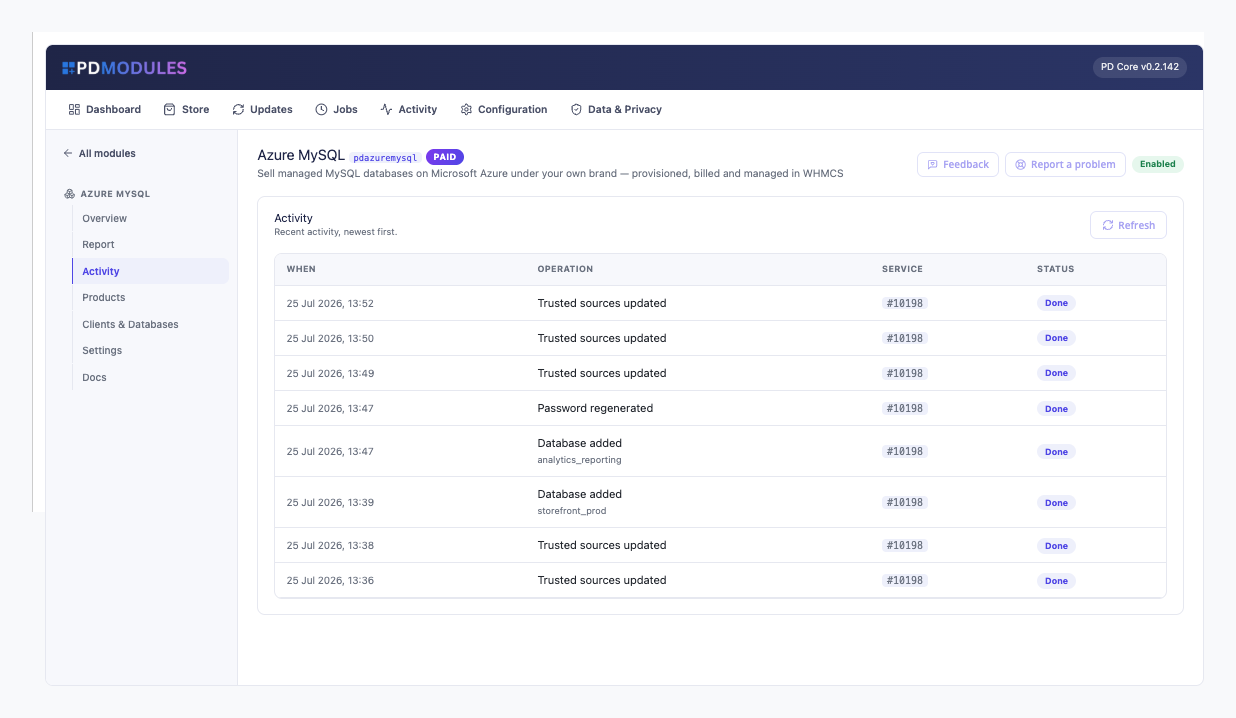
Activity: provisioning and lifecycle actions with their outcome
A Report with your licence, the configured Azure subscription, the database count and a secret-expiry countdown
Warnings 60, 30 and 7 days before your Azure client secret expires, and a guided message naming the fix if it already has
Read-only AI tools for service status, the database list and recent activity; nothing can create, resize or delete through them
What your customers get
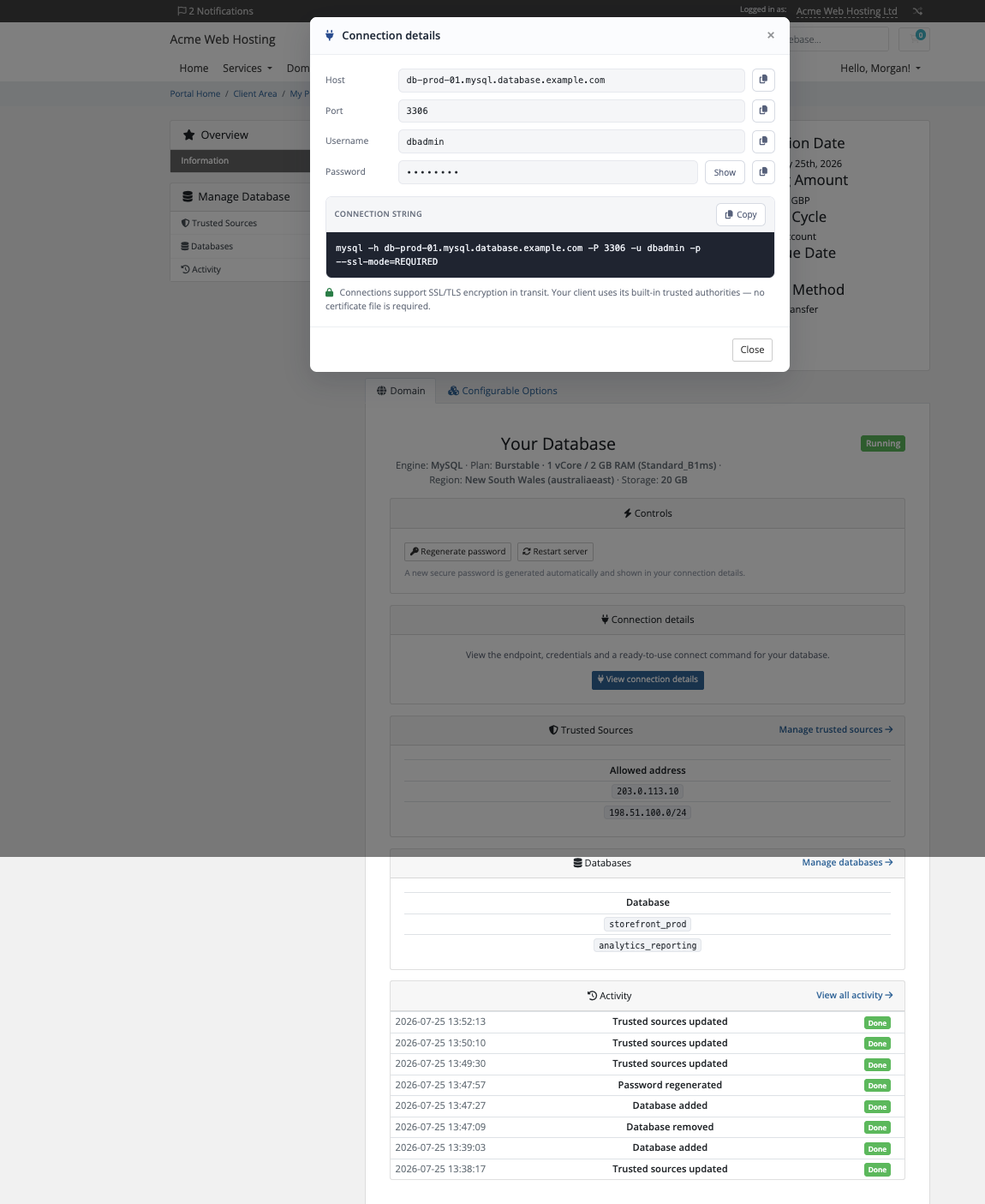
Connection details with Show and Copy: host, port 3306, the admin user dbadmin, the password and a ready-to-paste mysql command. Connections use TLS and need no certificate file
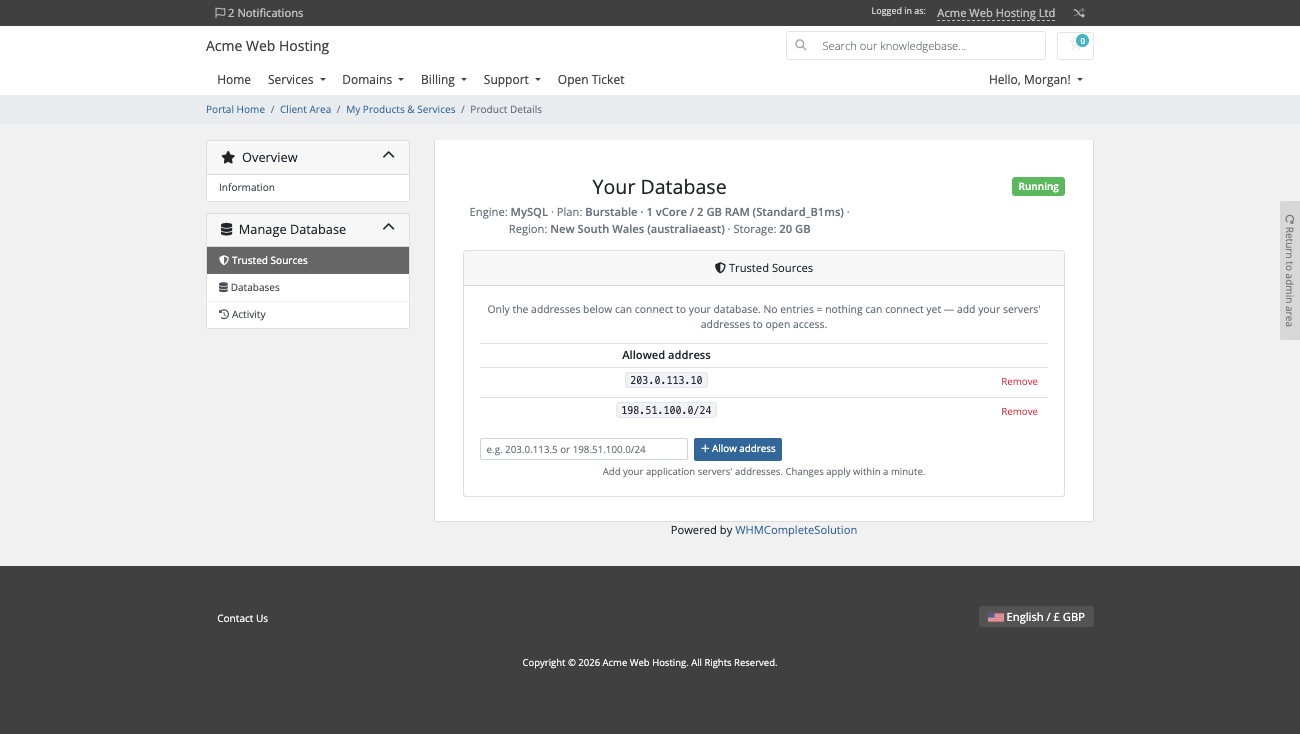
Trusted sources, an allow-list of IPv4 addresses or ranges they manage themselves. A new server accepts nothing until they add one, changes apply within a minute, and an invalid entry is refused with a message
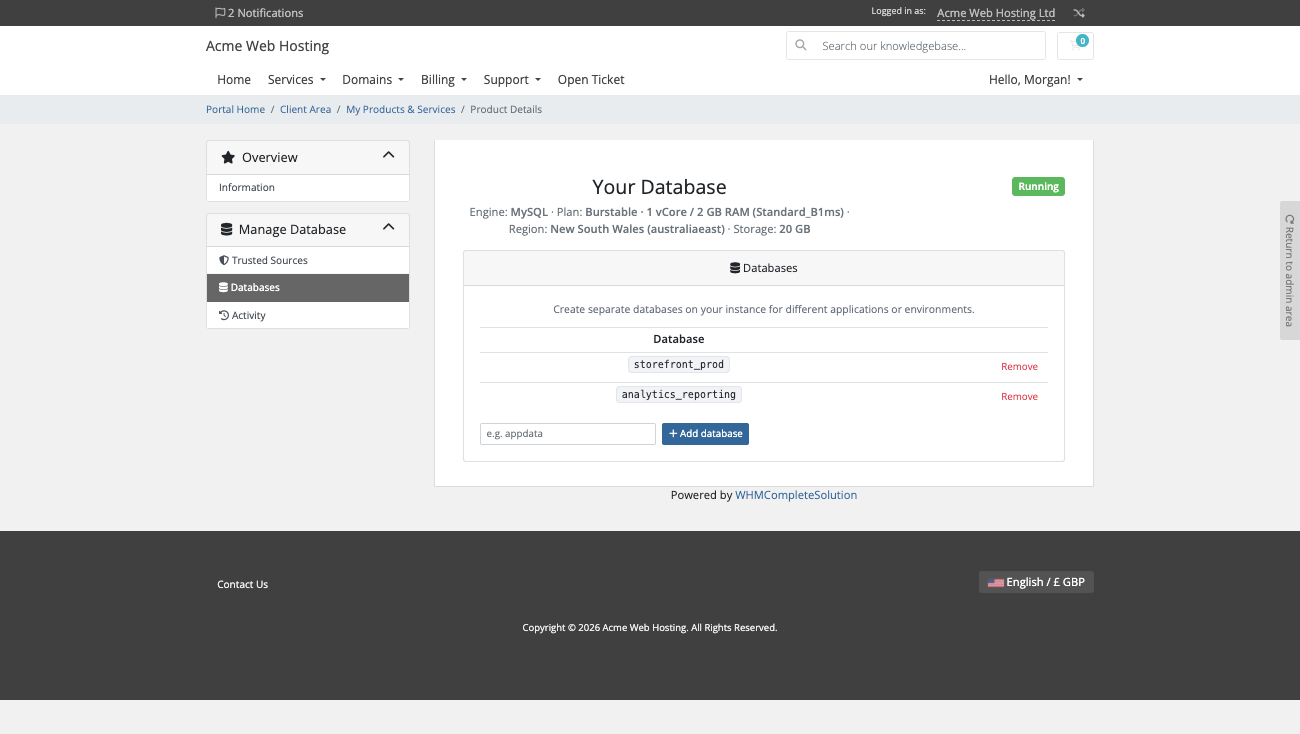
Their own databases: create and drop them from the client area. System databases are protected and a drop asks first
One-click password regeneration and a server restart, each behind a confirmation dialog in the page
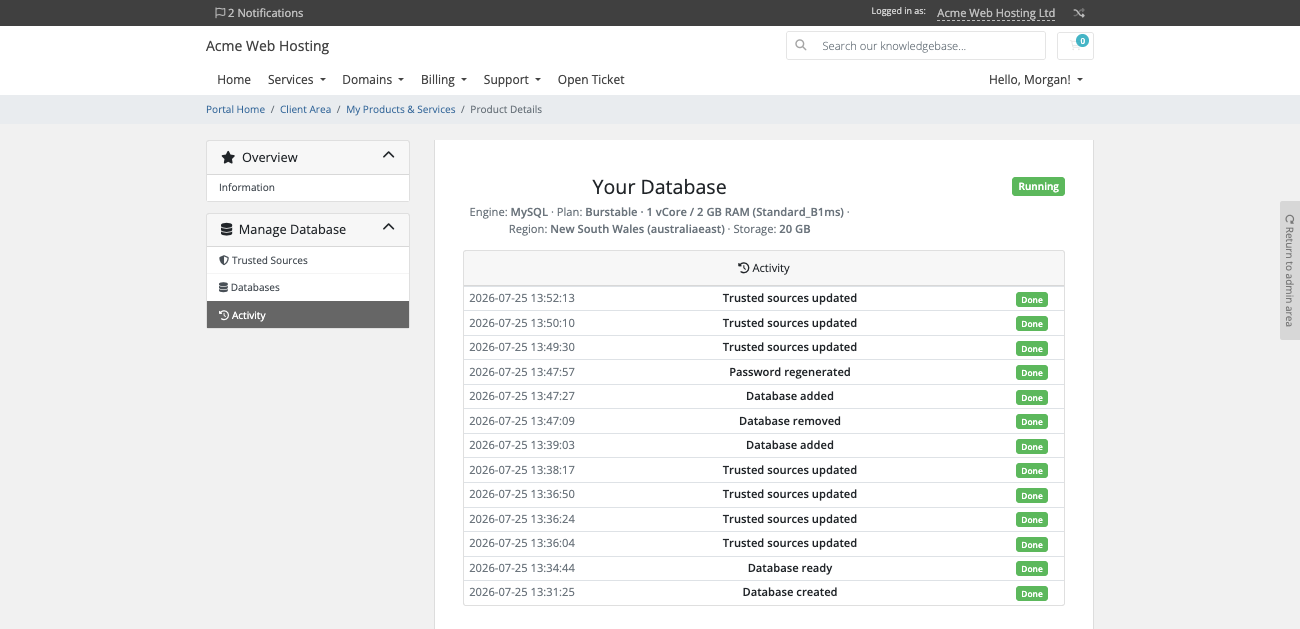
Activity, the last 40 actions in plain words with each outcome
Trusted sources: the customer lists the addresses allowed to reach the server and adds or removes them without a ticketDatabases: the customer creates and removes databases on their own serverActivity: every change to the server, from database added to password regenerated, with its outcome
Customers connect with the admin login, so the pages do not offer separate database users. A server's region is fixed when it is created, and moving region means a new order. Every feature is a switch on the product: turn one off and the page disappears and the action is refused, not only hidden. The pages render natively on WHMCS's Six, Twenty-One and Nexus themes and are fully translatable, with overrides that survive updates.
Security built in
Your Azure credential lives on the WHMCS server record, stored encrypted, and never reaches a customer page or message.
The database password is stored encrypted on the service and shown only to its owner.
TLS is enforced on every server's public endpoint.
Customer actions need a signed-in owner of the service and a valid security token.
Only licence data reaches us. No customer data or connection details do.
One product, every feature
PD Azure MySQL is one paid module with everything included: provisioning, trusted sources, self-service databases, resizing, suspension and teardown. There are no tiers to compare. It installs into PD Modules in one click, updates itself, and uninstalls cleanly without modifying any WHMCS files.
If your subscription ever lapses, nothing the module built is stopped, deleted or altered. New provisioning and admin configuration lock while existing services stay visible read-only and customers keep being served. Renewing restores everything.
Requirements
WHMCS 9 or later on PHP 8.2 or later, with the ionCube Loader
A Microsoft Azure subscription, with an Entra app registration that has the Contributor role and the MySQL resource provider registered
WHMCS's cron running, for background provisioning
PD Modules, the free control panel every PD module installs into
Questions
Do I need my own Microsoft Azure account?
Yes. You connect an Azure service-principal credential once, and every client's database is provisioned into your Microsoft Azure subscription — Microsoft bills you, you bill your client through WHMCS, and the difference is your margin.
Which MySQL versions can I sell?
MySQL 8.4 (the default) and 8.0. Machine sizes span Burstable, General Purpose and Memory Optimized — you can expose the version as a choice at checkout or fix it per product.
Can clients connect to their database from outside the cloud?
Yes. Each server gets a public endpoint on port 3306 with SSL/TLS, protected by a trusted-sources allow-list the client manages themselves — nothing can connect until they add an address.
Can clients manage their own databases?
Yes — from their client area they create and drop databases and regenerate the `dbadmin` admin password, with a ready-to-paste connect command and no Microsoft Azure console. Database users are not managed from the client area: the admin login is the connection identity.
What happens to a client's database if their invoice lapses?
Their service is suspended: the server is stopped, so compute billing pauses, and the data is kept untouched. When the invoice is paid and the service unsuspended, the server starts again. Data is only ever removed on termination.
Can clients upgrade their machine size or storage later?
Yes, through WHMCS's normal Upgrade/Downgrade flow. The server is resized in place with the data preserved, and storage also auto-grows on its own before the disk fills.
Which WHMCS and PHP versions does it need?
WHMCS 9 or later, on PHP 8.2 or later. It installs alongside whatever else you run — it adds its own tables and templates rather than modifying WHMCS files, so it does not collide with other vendors' modules or with a customised theme. Uninstalling removes its own tables and settings and leaves no orphans behind.