How to Update the DNS Nameservers at NetEarthOne, RegistrarClub or LogicBoxes-Based Registrars

Skip to main content
Print

How to Update the DNS Nameservers at NetEarthOne, RegistrarClub or LogicBoxes-Based Registrars

You can find our nameservers in your hosting welcome email. You need to update your domain nameservers to our nameservers.

If your domain is registered on NetEarthOne or LogicBoxes-based registrars, you should follow this tutorial to update your domain’s Nameservers.

1. Open the NetEarthOne.com or LogicBoxes-based registrar website and log in to your account.

2. After a successful login, click on List/Search Orders from the Manage Orders drop-down menu.
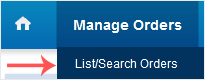
neo list domain

3. Under Domain Name, click on the appropriate choice.
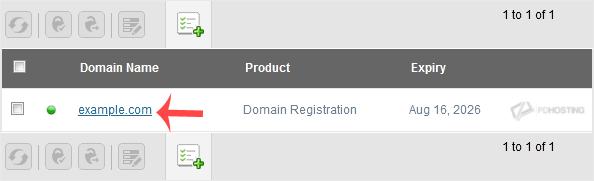
Select logicbox domain

4. Scroll down to the Domain Registration option and click on Name Servers.
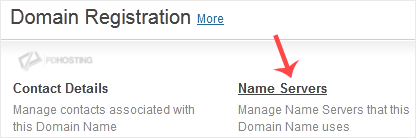
Update nameservers of domain

5. Enter the nameservers found in our Welcome Email and click on Update Name Servers.
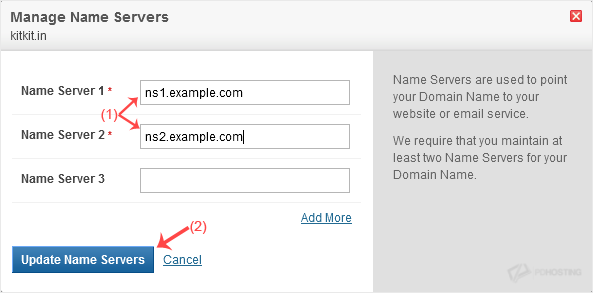
DNS update netearthone

Note: It may take anywhere from 12 to 24 hours for the changes to take effect worldwide.

Table of Contents

Get your website online with PD Hosting

UK hosting, domains and support from a real team. From a first site to a full server.

Terms and Conditions  ·  Privacy Policy

PD Hosting is the trading name of Projektif Digital Ltd, registered in England and Wales, company number 12482555.

PD Hosting
Privacy Overview

This website uses cookies so that we can provide you with the best user experience possible. Cookie information is stored in your browser and performs functions such as recognising you when you return to our website and helping our team to understand which sections of the website you find most interesting and useful.