PD Cloud Cost & Margin for WHMCS
£15/mo or £150 annual (save £30)
- Requires
- WHMCS 8.13 or later
- Version
- 0.2.18
- Updated
- 31 Oct 2026
Find out which services you are losing money on — and which resources nobody is paying for
Made and supported by Projektif Digital Ltd. Runs inside PD Modules, the panel every module installs into.
£15/mo or £150 annual (save £30)
£15/mo or £150 annual (save £30)
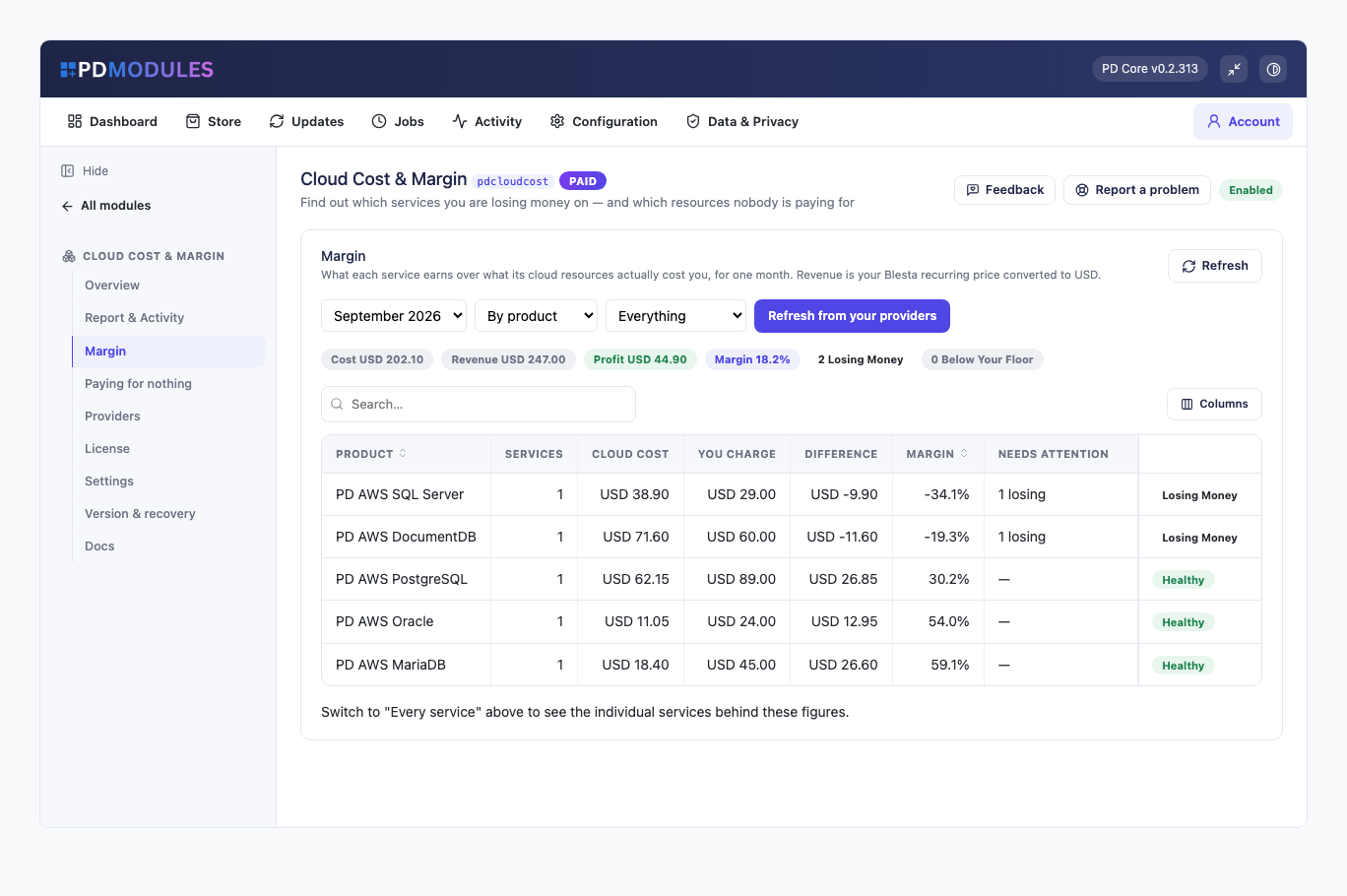
It happens quietly. A customer upgrades to a bigger instance and the price on their invoice never changes. Somebody cancels and the volume, the snapshot and the static address keep billing for eleven months. A provider raises a rate by nine percent and nothing notices.
WHMCS or Blesta knows what you charge. Your provider knows what you spend. Nothing joins the two up.
You point it at your cloud bill — AWS reads itself using the credentials your PD AWS modules already hold; for anything else you paste the per-resource cost export your provider already gives you.
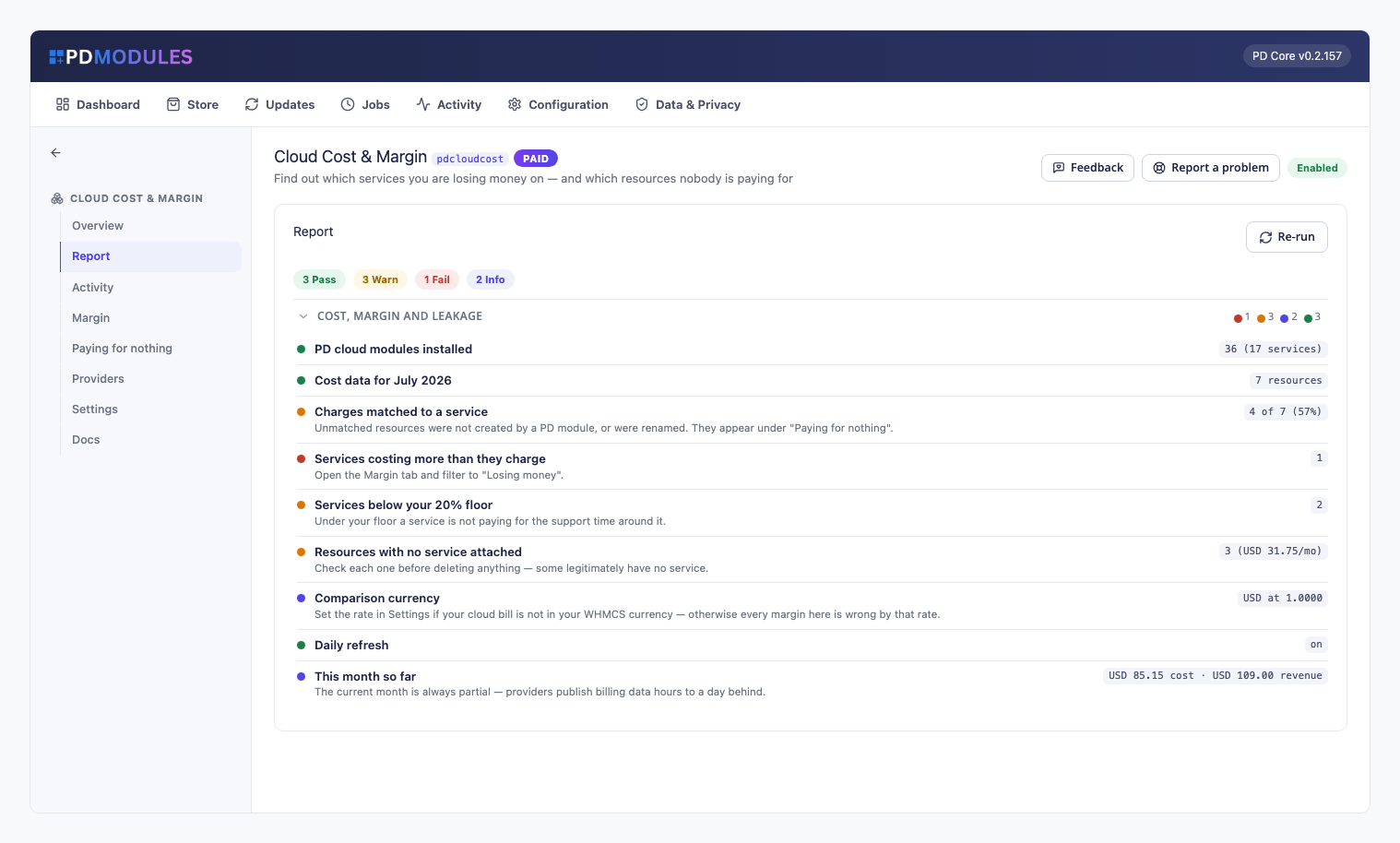
The module matches every charge to the WHMCS or Blesta service that should be paying for it, converts your revenue into the same currency, and tells you which services earn less than your floor, which cost more than they charge, and which resources are billing with nobody attached at all.
Your customer sees nothing. This is your P&L, not theirs.
It requires at least one PD cloud provisioning module — that is what names each resource after the service that owns it, and matching depends on it. Without one you still get accurate totals per provider, but no charge can be attributed to a customer.
Every charge on your cloud bill is matched back to the WHMCS or Blesta service that should be paying for it, and shown against what you actually charge — in one currency, for one month at a time.
If you resell AWS through a PD module, its credentials are already here: Cost Explorer is read for you, across every AWS account you have set up. Nothing new to configure and no second copy of a secret.
For anything else — Azure, Google Cloud, DigitalOcean, or AWS if you would rather — download the per-resource cost export your provider already offers and paste it in. The columns are found by reading the header, so whatever they are called this year, it works.
And nothing is ever deleted at your provider. This reads your bill. What to switch off is your decision, taken where you can see the whole picture.
PD Cloud Cost & Margin is available for WHMCS (8.13 or later) and Blesta (6.0 or later). Each has its own page with the screenshots, requirements and price for that system. A module is added to the PD Modules licence of the installation it runs on, so a WHMCS installation and a Blesta installation each hold their own licence.
No. For AWS it uses the server credentials your PD AWS modules already hold, so there is nothing new to set up and no second copy of a secret. For every other provider it reads a cost export you paste in — no credentials at all.
Because the month is not over, and because providers publish billing data hours to a day behind. Compare completed months; the current one is always partial.
No, deliberately. Nothing here writes to your provider. A resource can legitimately have no service attached — your own backups, a shared load balancer, something a colleague is mid-way through. Mark those as expected and they stop appearing; delete the rest in your provider console.
Because a wrong rate makes every margin on the page wrong, and a live rate that quietly went stale is worse than one you chose on purpose and know the age of.
AWS charges a small amount per Cost Explorer request. The refresh runs once a day, which keeps that to pennies a month. The cost-export path costs nothing.
The margin figures you already have stay readable — that is your business data, not ours. Refreshing, importing and the orphan list pause until the licence is active again.
Your customers' data stays in your WHMCS or Blesta. To confirm your licence, the platform sends us four things and nothing else: your licence key, the domain, your server's own IP address and the directory it is installed in — the four values recorded against your licence in your client area. Alongside that we see which module and version you run and whether its licence is healthy, so we can ship compatible updates. We never receive your clients' personal data, your credentials, or the contents of your WHMCS or Blesta. Crash reports are off unless you turn them on, and a diagnostic report is only ever sent when you send one, after showing you a preview you can edit.
Open a ticket from your client area, or use Get help inside the PD Modules panel, which attaches a diagnostic report — you see a preview of exactly what it contains, and can exclude any part of it, before anything is sent. Support is included with an active subscription; bug reports are welcome whatever your licence state.

Resell Amazon Lightsail as your own VPS — provisioned, billed and managed in WHMCS or Blesta
Resell Amazon EC2 compute as your own cloud servers — provisioned, billed and managed in WHMCS or Blesta
Resell fully-managed MySQL databases on AWS — provisioned, billed and managed in WHMCS or Blesta
 Featured
Automatic discounts, product bundles and free trials for WHMCS or Blesta — rule-based, no promo code needed