PD AWS Oracle for WHMCS
£15/mo or £150 annual (save £30)
- Requires
- WHMCS 8.13 or later
- Version
- 0.4.61
- Updated
- 5 Nov 2026
Resell fully-managed Oracle databases on AWS — provisioned, billed and managed in WHMCS or Blesta
Made and supported by Projektif Digital Ltd. Runs inside PD Modules, the panel every module installs into.
£15/mo or £150 annual (save £30)
£15/mo or £150 annual (save £30)
Most WHMCS or Blesta hosts can resell MySQL or PostgreSQL with a control panel. Oracle is different: the licence, the tooling, and the infrastructure complexity puts it out of reach for most resellers. PD AWS Oracle removes every barrier.
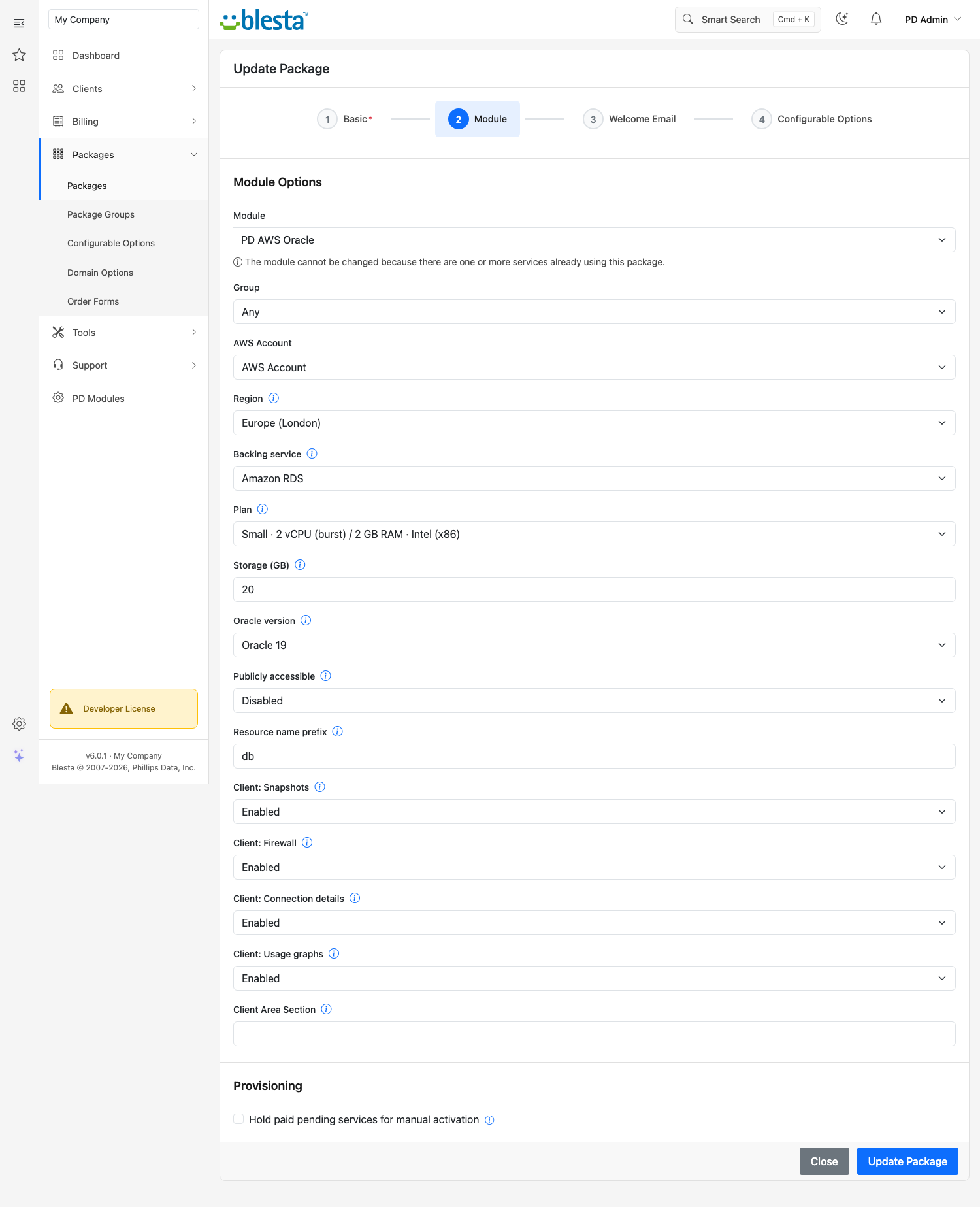
Each order provisions a dedicated Oracle SE2 instance on Amazon RDS — license-included, encrypted at rest, with automated daily backups. Your client gets enterprise-grade Oracle without you needing an Oracle DBA or a dedicated database server.
From the PD Modules admin panel you can:
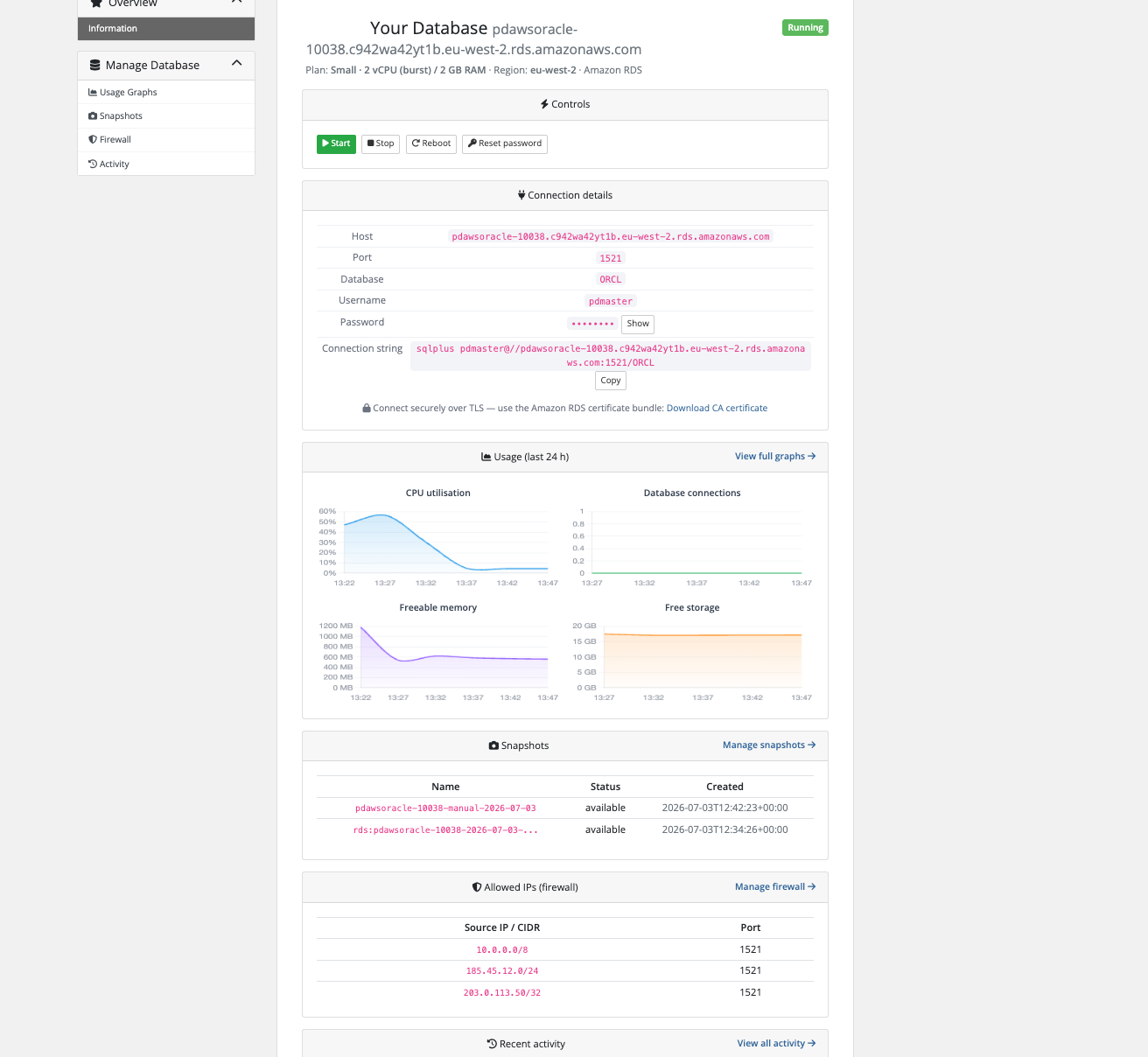
Each database gets its own management portal inside your WHMCS or Blesta, with dedicated pages reached from a left-hand menu:
PD AWS Oracle is part of the PD Modules AWS database family, sharing the same provisioning engine as PD AWS MySQL, MariaDB, PostgreSQL and SQL Server. Each engine is sold as its own module with its own product — because they have different plans, different pricing and different clients.
PD AWS Oracle is available for WHMCS (8.13 or later) and Blesta (6.0 or later). Each has its own page with the screenshots, requirements and price for that system. A module is added to the PD Modules licence of the installation it runs on, so a WHMCS installation and a Blesta installation each hold their own licence.
Oracle SE2 (Standard Edition 2) with the license-included model — the AWS managed Oracle offering. SE2 supports up to 4 CPU sockets (mapped to 2 vCPUs on db.t3 / db.m5 instances) and is the edition most WHMCS or Blesta clients need. Enterprise Edition (EE) with Bring Your Own Licence (BYOL) is not currently supported.
No. The license-included model means AWS covers the Oracle licence fee in the per-hour RDS cost. You do not need to purchase or manage a separate Oracle licence.
All AWS regions that support Oracle SE2 on RDS, including Europe (London), Europe (Ireland), Europe (Frankfurt), US East (N. Virginia), US West (Oregon), Asia Pacific (Tokyo, Seoul, Sydney, Singapore, Mumbai), and Canada (Montreal). Set the region per product in WHMCS or Blesta Module Settings.
Databases are created as VPC-only by default (not publicly accessible). To allow external connections, the admin can tick 'Publicly accessible' in the product Module Settings, and the client then adds their source IP in the Firewall tab of their client area.
The WHMCS or Blesta TerminateAccount hook deletes the RDS instance from AWS. If any manual snapshots exist, they are preserved (AWS does not auto-delete manual snapshots on instance deletion). Automated RDS snapshots are removed with the instance.
Yes. Create one WHMCS or Blesta product per plan tier, set the Module Settings 'Plan' field to the RDS instance class (e.g. db.t3.small or db.m5.large), and optionally generate configurable options for each product so clients can also choose storage size.
The region code (e.g. eu-west-2) is shown in the client area for transparency, but the client has no direct AWS account access. All AWS API calls are made server-side using your IAM credentials.
No — the module provisions and manages new instances, and does not adopt an Oracle RDS instance that was created outside WHMCS or Blesta. If you have existing instances you want billed and managed here, get in touch before you buy and we'll tell you honestly whether it fits.
Yes. PD AWS Oracle, PD AWS MySQL, PD AWS MariaDB, and PD AWS PostgreSQL share the same engine library and admin panel within PD Core, but are independent WHMCS or Blesta products with separate licences. You can install as many or as few as you need.
Nothing of yours is touched, and nothing is deleted. The module steps down in stages instead: a 14-day grace period where everything still works and you get a renewal reminder, then admin management locks while your customers carry on being served, and only after that do the customer-facing features stop — behind a neutral "temporarily unavailable, please contact support" message that never mentions licensing to your customer. Anything the module provisioned keeps running in your own account throughout, and your data and settings stay exactly where they are. Renewing restores everything immediately.
Your customers' data stays in your WHMCS or Blesta. To confirm your licence, the platform sends us four things and nothing else: your licence key, the domain, your server's own IP address and the directory it is installed in — the four values recorded against your licence in your client area. Alongside that we see which module and version you run and whether its licence is healthy, so we can ship compatible updates. We never receive your clients' personal data, your credentials, or the contents of your WHMCS or Blesta. Crash reports are off unless you turn them on, and a diagnostic report is only ever sent when you send one, after showing you a preview you can edit.
Resell Amazon EC2 compute as your own cloud servers — provisioned, billed and managed in WHMCS or Blesta
Resell Amazon Lightsail as your own VPS — provisioned, billed and managed in WHMCS or Blesta
Resell fully-managed MariaDB databases on AWS — provisioned, billed and managed in WHMCS or Blesta
Resell fully-managed MySQL databases on AWS — provisioned, billed and managed in WHMCS or Blesta