PD Google Cloud DNS for WHMCS
£12/mo or £120 annual (save £24)
- Requires
- WHMCS 8.13 or later
- Version
- 0.1.103
- Updated
- 5 Nov 2026
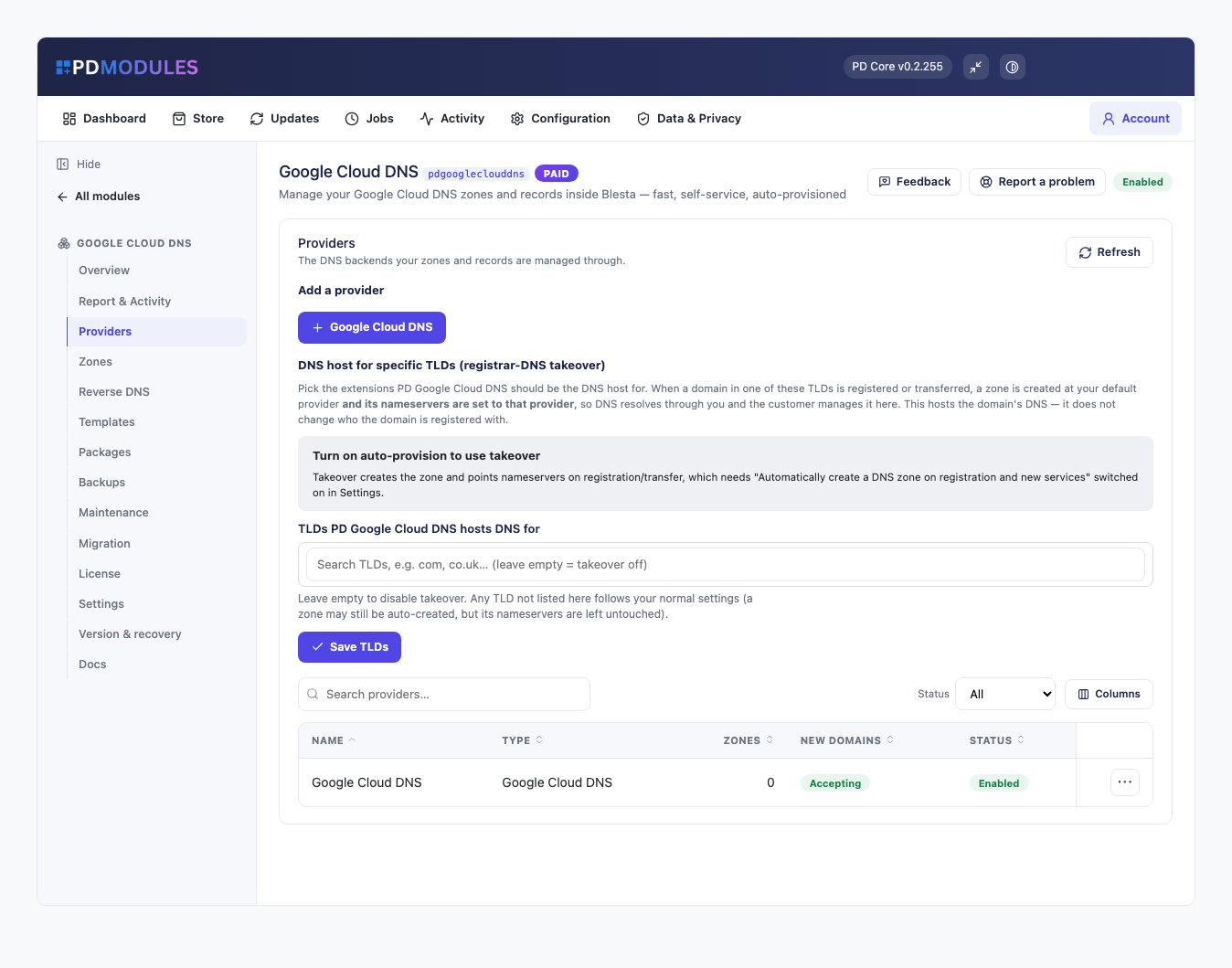
Manage your Google Cloud DNS zones and records inside WHMCS or Blesta — fast, self-service, auto-provisioned
Made and supported by Projektif Digital Ltd. Runs inside PD Modules, the panel every module installs into.
£12/mo or £120 annual (save £24)
£12/mo or £120 annual (save £24)
If your infrastructure runs on Google Cloud DNS, PD Google Cloud DNS brings every hosted zone and record under your WHMCS or Blesta admin — and gives your customers a clean, self-service Manage DNS portal so they can add and update their own records without opening a support ticket.
Every zone in your GCP project appears in a fast, searchable list the moment you connect. No import. No sync. No manual setup per zone. The list pages server-side, so performance stays consistent whether you have ten zones or ten thousand.
Open any zone and you get a full record editor with live filtering by type and name. Changes write directly to Google Cloud DNS — there is no local cache to get out of sync.
Bind any zone to a WHMCS or Blesta client and a Manage DNS link appears in their client portal — on their domain page, their service page, or in the navigation. Customers use the same type-aware editor to add, edit and delete their own records, without support involvement and without any access to your Google Cloud account.
Scheduled BIND-format snapshots of every zone run automatically. Restore any zone to a previous state in one click — the restore writes directly to Google Cloud DNS. Download any snapshot as a BIND zone file.
A DNS zone is created in your GCP project automatically whenever a customer registers or transfers a domain, or orders a service. Restrict it to specific TLDs with the per-provider TLD takeover list.
Authenticate with a dedicated GCP service account. Your team works inside WHMCS or Blesta — no one needs access to the Google Cloud Console for day-to-day DNS work.
---
---
roles/dns.admin)PD Google Cloud DNS is available for WHMCS (8.13 or later) and Blesta (6.0 or later). Each has its own page with the screenshots, requirements and price for that system. A module is added to the PD Modules licence of the installation it runs on, so a WHMCS installation and a Blesta installation each hold their own licence.
No. PD Google Cloud DNS reads and writes records live through the Google Cloud DNS API, applying each change as a whole-rrset transaction. Google Cloud DNS remains the authoritative source of truth — there is no local cache to get out of sync. The module stores only metadata — zone ownership, backup snapshots and activity logs — in your WHMCS or Blesta database.
A Google Cloud project with the Cloud DNS API enabled, and a service account with the DNS Administrator role (roles/dns.admin). You paste the full service-account key JSON when adding the provider; it is stored encrypted and masked. Your team then works entirely inside WHMCS or Blesta — no one needs day-to-day access to the Google Cloud Console.
Yes. Add multiple providers in the Providers panel — one per GCP project or service account. You can manage the managed zones from all of them through the same interface.
No. PD Google Cloud DNS does not manage DNSSEC. If you need DNSSEC on a zone, enable and manage it on the managed zone directly in the Google Cloud Console; the module leaves that configuration untouched.
Only what you already pay your provider. PD Google Cloud DNS adds no per-unit fee and takes no cut — it connects to your own account with your own credentials, so the provider bills you directly at your rates, and you set what you charge your customers. From us it is the module subscription and nothing else.
 Featured
Manage DNS zones and records for any provider — Cloudflare, Route 53, cPanel, PowerDNS and more, in WHMCS or Blesta

Rich client, service & domain notes with reminders
Sell cloud servers on Google Cloud under your own brand — provisioned, billed and managed in WHMCS or Blesta
Sell Google Cloud Storage under your own brand — provisioned, metered and billed in WHMCS or Blesta